> ## Documentation Index
> Fetch the complete documentation index at: https://parabola.io/docs/llms.txt
> Use this file to discover all available pages before exploring further.
# How to compare columns between two datasets in Parabola
> Need to compare two datasets to see which columns are the same and which are missing from either one? Follow these steps to quickly identify overlapping or missing columns using Parabola.
## ✅ Step-by-Step Instructions
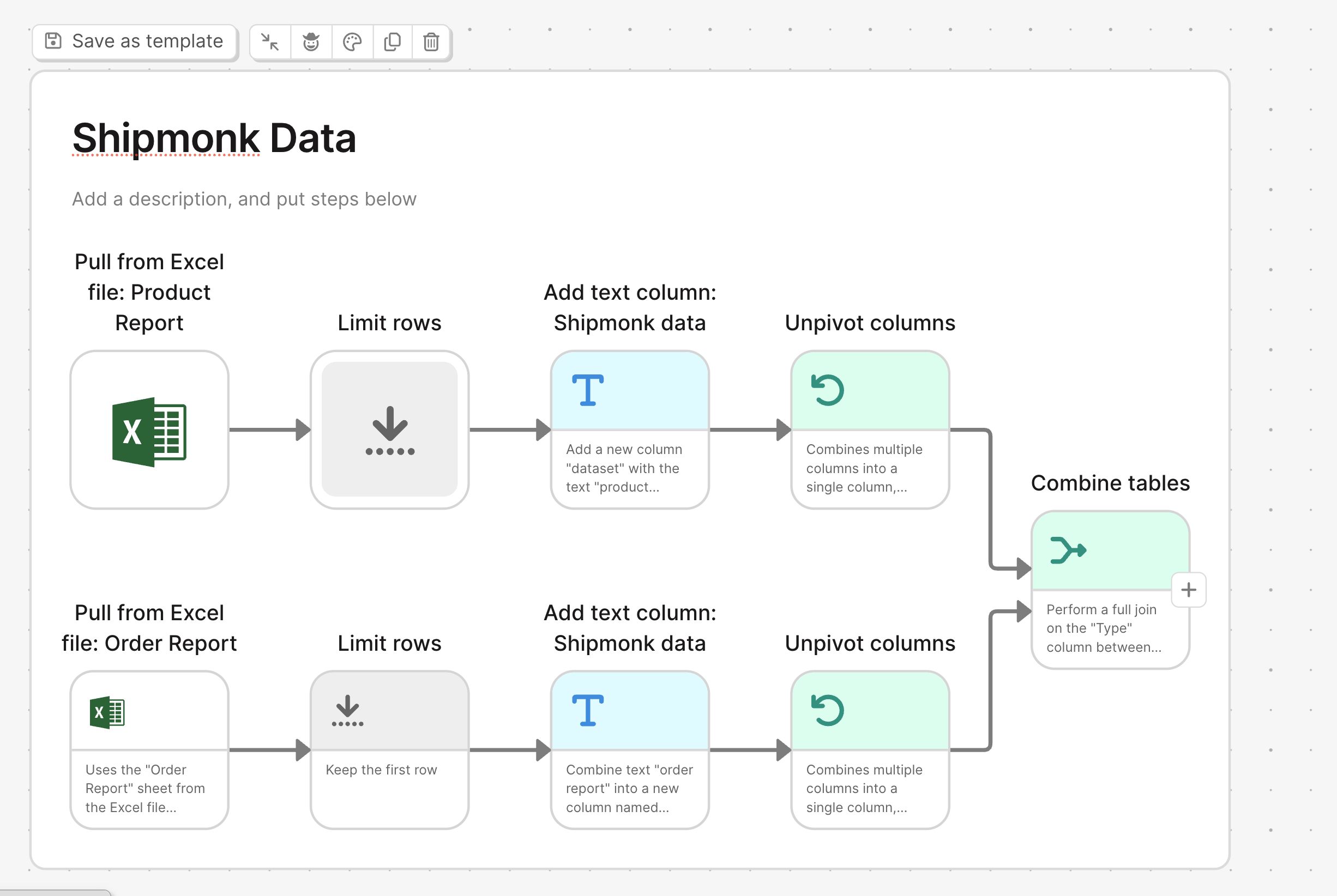
Bring in the two datasets you want to compare using two data import steps.
Add a **limit Rows** step to each dataset to limit them to just 1 row. You only need the column names and 1 row of data for this comparison.
Add an **Add Text Column** step to each dataset.
* Create a new column called something like `type`
* Assign a unique value to each: e.g., `Dataset 1` and `Dataset 2`
Use an **Unpivot Columns** step on each dataset.
* Unpivot all columns except the new `type` column
* This transforms column headers into row values
Use a **Combine tables** step:
* Match on the `column` name from each unpivoted dataset
* Keep **all rows** to include matches and differences
The output will show:
* Which columns are shared between the two datasets
* Which columns are missing from either one
## 🧠 Why This Works
By unpivoting and tagging each dataset, you convert column headers into values, which makes it easy to compare structure across datasets using Parabola's visual tools—no code needed.
Let us know if you want a template for this setup!