> ## Documentation Index
> Fetch the complete documentation index at: https://parabola.io/docs/llms.txt
> Use this file to discover all available pages before exploring further.
# Ask about your workspace
> Ask questions about your Prowork workspace in plain language - what exists, who owns it, what's failing, and what's already been built.
**Ask is in beta.** After the beta period, we plan to make Ask available to all customers on the Team, Advanced, and Enterprise plans. If you'd like access to the beta, reach out to your account manager or [help@parabola.io](mailto:help@parabola.io). Usage is not billed while Ask is in beta.
Ask is a chat experience inside Prowork that answers questions about your own workspace. Instead of clicking through Flows one at a time to figure out what your team has built, who owns what, or what's been failing, you ask in plain language and get an answer.
It's the same workspace intelligence available through [the MCP](/docs/product/account/mcp), without any setup. Just sign in to Prowork the way you always do and start asking.
## Open Ask
Click **Ask** at the top of the left sidebar.
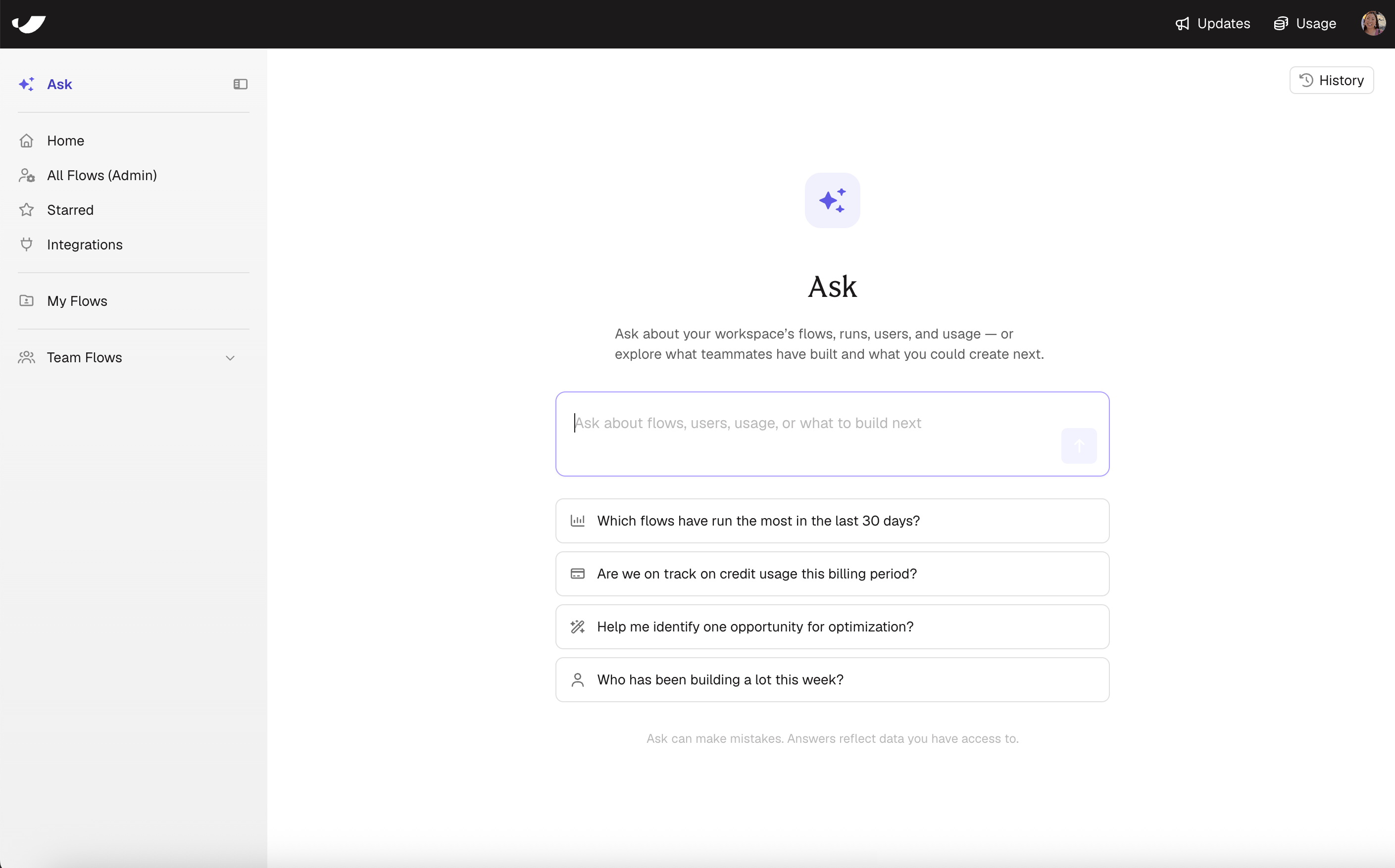 The landing screen gives you a text box and a few starter questions. Type your own question, or click one of the suggestions to see the shape of what Ask can do. **History** in the top right holds your previous conversations.
## What Ask can answer
Ask is read-only. It answers questions about your workspace — it doesn't build, edit, or run anything.
**Scope your question.** Ask works best with boundaries — a time range, a person, a team, an integration. If a question pulls back too much, Ask narrows it and retries on its own, but that's slower than asking a targeted question up front.
The landing screen gives you a text box and a few starter questions. Type your own question, or click one of the suggestions to see the shape of what Ask can do. **History** in the top right holds your previous conversations.
## What Ask can answer
Ask is read-only. It answers questions about your workspace — it doesn't build, edit, or run anything.
**Scope your question.** Ask works best with boundaries — a time range, a person, a team, an integration. If a question pulls back too much, Ask narrows it and retries on its own, but that's slower than asking a targeted question up front.
Instead of asking "Which Flows have failed?" try "Which Flows have failed in the last 14 days?"
### Discovery: what has my team built?
Useful when you've inherited a workspace, joined a team, or need to explain your investment to someone else.
* *What has the operations team built in the last 90 days?*
* *Which Flows created this year have "invoice" or "billing" in the name?*
* *Show me the Flows created since July, grouped by owner.*
### Operational health: what's broken?
* *Which Flows have failed more than twice in the last 14 days?*
* *Of the Flows owned by the finance team, which have failed at least once this month, and what's the failure rate on each?*
* *Which Flows on a daily schedule haven't completed a successful run in the last 7 days?*
* *Which Flows are paused and were last edited more than 90 days ago?*
### Coverage: what happens when someone is out?
The Flows one person owns and runs by hand are the ones that quietly stop when that person is on vacation or leaves.
* *Sarah Chen is out next week. Which of her Flows have run in the last 30 days?*
* *Which Flows owned by Marcus Webb have no automated trigger and ran at least once in the last 30 days?*
* *Joanna Reyes is leaving at the end of the month. Show me her Flows with an active trigger that have run in the last 60 days.*
### Adoption and usage
* *Are we on track on credit usage this billing period?*
* *How many Flows were created in the last 30 days, and by whom?*
* *Which people on the marketing team haven't created a Flow in the last 90 days?*
* *Compare the number of Flows created this month to last month.*
### Reuse: has someone already built this?
* *Show me Flows owned by the finance team with "reconciliation" in the name.*
* *Which Flows created in the last 6 months use the NetSuite integration?*
* *What are Ana Delgado's five most recently created Flows?*
## Permissions
Ask respects your existing permissions. It can only answer using Flows you already have editor or viewer access to. If you can't see it in the app, Ask can't see it either.
Org admins and content admins have full workspace visibility in Prowork, so they get full workspace visibility in Ask too. Most leadership-style questions — adoption, coverage, health across the org — need that level of access to be useful.
If Ask's answers feel thin, it's usually one of two things:
* **You don't have access to much.** Someone who can only see their own Flows will get answers about their own Flows. Check whether your role matches what you're trying to do.
* **Flows aren't being shared.** Ask can only describe what's in the workspace. If most people are building in private, there isn't a shared picture to describe yet. See [sharing Flows](/docs/product/canvas/sharing-flows).
## Limitations
* **Read-only.** Ask answers questions. It doesn't create, edit, pause, or run Flows.
* **No per-Flow cost attribution.** Ask reports credit usage at the workspace level, not per Flow.
* **No step-level logic.** Ask sees what a Flow is and how it runs, not the transformation logic inside each step.
* **Answers can be wrong.** Ask is generating an answer from your workspace data, and it can misread or miss things. Verify before you act.
## We want to hear from you
Ask gets better with feedback from people using it on real workspaces. When an answer lands well — or misses — rate the chat with a thumbs up or thumbs down and leave a comment about what you were trying to find out. That feedback goes straight to the team building Ask.
We'd also love to hear from you at [help@parabola.io](mailto:help@parabola.io).