> ## Documentation Index
> Fetch the complete documentation index at: https://parabola.io/docs/llms.txt
> Use this file to discover all available pages before exploring further.
# Connect ExchangeRate-API to Parabola
> Pull live and historical FX rates from ExchangeRate-API into Parabola to convert invoices, normalize multi-currency revenue, and run month-end FX adjustments.
ExchangeRate-API is a currency conversion service that returns live and historical exchange rates for 160+ world currencies via a simple REST API. Connecting ExchangeRate-API to Parabola lets finance and ops teams convert amounts in bulk, normalize multi-currency revenue to a reporting currency, and refresh stale FX values across reports without spreadsheet lookups or paid ETL tooling.
## Pull from ExchangeRate-API
The **Pull from ExchangeRate-API** step calls the ExchangeRate-API endpoints with your API key and loads the result into your flow. Use it to fetch the latest rate for a currency pair, convert a specific amount, or pull rate history for a base currency.
## How to authenticate
ExchangeRate-API uses a simple API key for authentication.
**Get your API key from ExchangeRate-API**
* Sign up at [ExchangeRate-API](https://app.exchangerate-api.com/sign-up) (no credit card required for the free plan, which includes 1,500 requests per month).
* Copy your API key from the dashboard and store it somewhere secure.
**Connect in Parabola**
* In your Parabola flow, add a **Pull from ExchangeRate-API** step.
* Click **Authorize** and paste your API key when prompted.
* Parabola stores the key securely and uses it on every request.
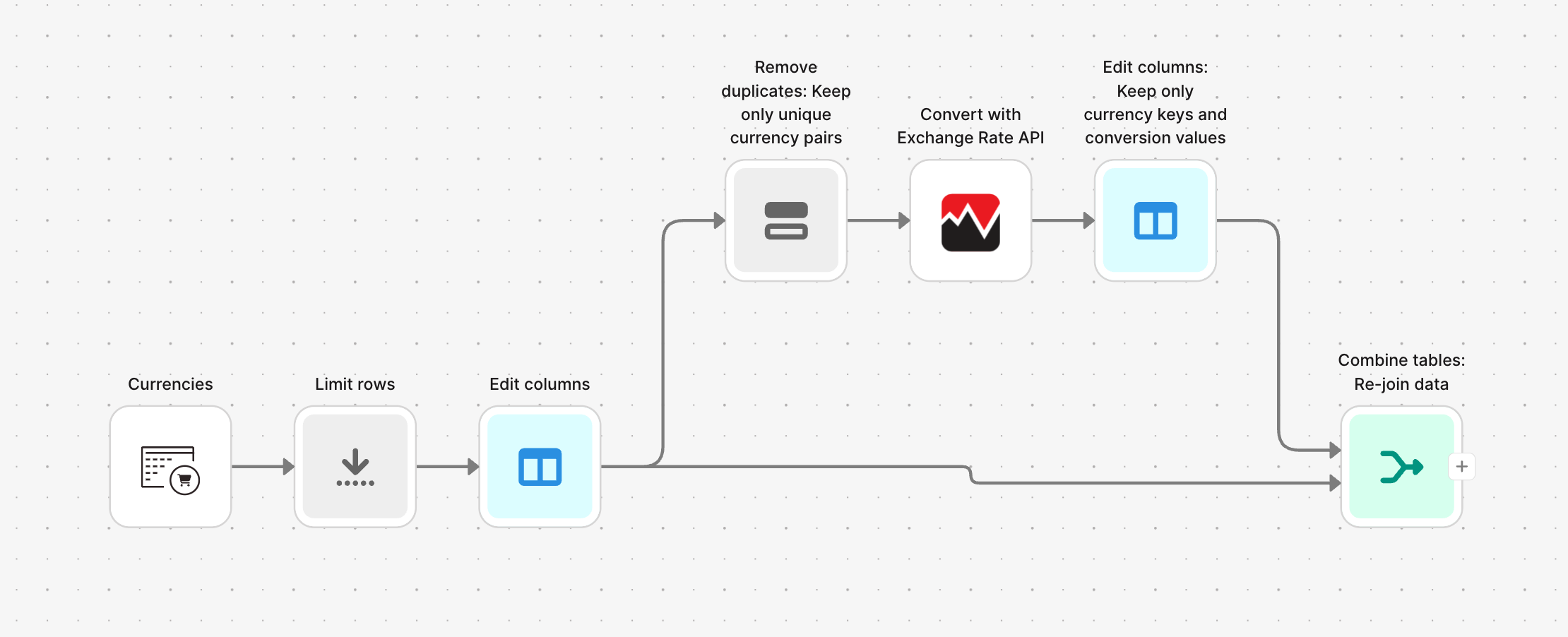
**Reduce API calls by deduplicating currency pairs first.**
Before the conversion step, use Parabola's **Remove duplicates** step on your currency pair columns to eliminate redundant requests. This keeps you under your monthly quota, especially on the free plan. Then use a **Combine tables** step to rejoin live rates back to the original rows.
 ## Available data
Using the ExchangeRate-API integration, you can pull:
* **Currency pair conversion rates** — the latest rate between any two currencies using ISO 4217 three-letter codes (USD, EUR, GBP, JPY, etc.). Each response includes the base currency, target currency, conversion rate, and the timestamps for last and next update.
* **Currency conversions with amounts** — convert a specific amount from one currency to another and get back both the rate and the calculated result. Useful for invoice totals, product prices, or transaction batches.
* **Update timestamps** — every response includes `time_last_update` and `time_next_update`, so you always know how fresh the rate is.
## Common use cases
* **Normalize multi-currency revenue**: Pull transactions from [Shopify](/product/integration/shopify), [Stripe](/product/integration/stripe), [Amazon Seller Central](/product/integration/amazon-seller-central), or [Squarespace](/product/integration/squarespace), convert each amount to your reporting currency, and post the result to [NetSuite](/product/integration/netsuite) or [QuickBooks Online](/product/integration/quickbooks-online).
* **Display localized pricing**: Convert a product catalog from [Shopify](/product/integration/shopify) or [Magento](/product/integration/magento) into local currencies before pushing it to a regional storefront or [Airtable](/product/integration/airtable) sheet.
* **Reconcile cross-currency invoices and payments**: Match vendor invoices or customer payments in different currencies against your books by converting everything to a single base currency. Pair this with [Ramp](/product/integration/ramp) or [Coupa](/product/integration/coupa) data for a full AP reconciliation.
* **Audit historical conversion rates**: Compare the rates used in past transactions against current market rates to flag discrepancies, overcharges, or stale values, then drop the audit into [Google Drive](/product/integration/google-drive) or [Smartsheet](/product/integration/smartsheet).
* **Automate landed cost calculations**: Combine FX rates with freight invoices from [DHL](/product/integration/dhl), [FedEx](/product/integration/fedex), or [Flexport](/product/integration/flexport), plus customs and tariff data, to calculate landed cost in your reporting currency for international inbound shipments.
* **Month-end FX revaluation**: On the last day of the month, pull rates for every currency in your books, revalue foreign-currency balances, calculate unrealized gains and losses, and post journal entries to [NetSuite](/product/integration/netsuite) or [SuiteQL](/product/integration/suiteql).
* **Alert on big rate moves**: Filter for currency pairs where the daily rate moved more than X percent and send a [Slack](/product/integration/slack) message to the finance team.
## Tips for using Parabola with ExchangeRate-API
* **Deduplicate currency pairs upstream.** A 50,000-row transaction file may only contain 20 unique currency pairs. Pull rates once per pair, then rejoin to the full table to stay under your quota.
* **Separate rate lookup from conversion.** Pull unique pairs first, rejoin to the original rows, then use **Add math column** to multiply amounts by rates. This is faster and uses far fewer API calls than converting row by row.
* **Schedule after the daily refresh.** ExchangeRate-API updates rates once per day for most plans (around midnight GMT). Run your flow in the morning so it picks up the new rates.
* **Save historical rates for trend analysis.** Append each day's rates to a [Google Drive](/product/integration/google-drive) sheet or a database with a timestamp to build a history you can use for volatility analysis or audits.
* **Standardize currency codes first.** Use **Find & replace** or **Edit text** to enforce ISO 4217 (three uppercase letters) on every code before the API call. "usd" and "Usd" will both fail.
* **Match cadence to use case.** Daily for revenue normalization and reporting, weekly for catalog re-pricing, month-end for FX revaluation and JE postings.
## FAQ
### Which API plan do I need?
The free plan covers 1,500 requests per month and is enough for small flows that deduplicate pairs first. For larger volumes or historical-rate access, upgrade to a paid plan. See [ExchangeRate-API pricing](https://www.exchangerate-api.com/#pricing).
### Can I pull historical exchange rates?
Yes, on paid plans that include the historical endpoint. Use a **Pull from an API** step pointed at the historical URL with your API key and the date you want.
### How fresh are the rates?
The free and standard plans update rates once per day. Higher-tier plans update more frequently. Every response includes `time_last_update` and `time_next_update` so you can confirm freshness in your flow.
### What happens if I exceed my monthly quota?
ExchangeRate-API returns a quota-exceeded error. Reduce calls by deduplicating currency pairs before the API step, run your flow less often, or upgrade your plan.
***
With ExchangeRate-API and Parabola connected, the FX conversions your finance team handles by hand each month — invoice normalization, revenue rollups, period-end revaluation — run on a schedule with output landing in the systems where finance actually works.
## Available data
Using the ExchangeRate-API integration, you can pull:
* **Currency pair conversion rates** — the latest rate between any two currencies using ISO 4217 three-letter codes (USD, EUR, GBP, JPY, etc.). Each response includes the base currency, target currency, conversion rate, and the timestamps for last and next update.
* **Currency conversions with amounts** — convert a specific amount from one currency to another and get back both the rate and the calculated result. Useful for invoice totals, product prices, or transaction batches.
* **Update timestamps** — every response includes `time_last_update` and `time_next_update`, so you always know how fresh the rate is.
## Common use cases
* **Normalize multi-currency revenue**: Pull transactions from [Shopify](/product/integration/shopify), [Stripe](/product/integration/stripe), [Amazon Seller Central](/product/integration/amazon-seller-central), or [Squarespace](/product/integration/squarespace), convert each amount to your reporting currency, and post the result to [NetSuite](/product/integration/netsuite) or [QuickBooks Online](/product/integration/quickbooks-online).
* **Display localized pricing**: Convert a product catalog from [Shopify](/product/integration/shopify) or [Magento](/product/integration/magento) into local currencies before pushing it to a regional storefront or [Airtable](/product/integration/airtable) sheet.
* **Reconcile cross-currency invoices and payments**: Match vendor invoices or customer payments in different currencies against your books by converting everything to a single base currency. Pair this with [Ramp](/product/integration/ramp) or [Coupa](/product/integration/coupa) data for a full AP reconciliation.
* **Audit historical conversion rates**: Compare the rates used in past transactions against current market rates to flag discrepancies, overcharges, or stale values, then drop the audit into [Google Drive](/product/integration/google-drive) or [Smartsheet](/product/integration/smartsheet).
* **Automate landed cost calculations**: Combine FX rates with freight invoices from [DHL](/product/integration/dhl), [FedEx](/product/integration/fedex), or [Flexport](/product/integration/flexport), plus customs and tariff data, to calculate landed cost in your reporting currency for international inbound shipments.
* **Month-end FX revaluation**: On the last day of the month, pull rates for every currency in your books, revalue foreign-currency balances, calculate unrealized gains and losses, and post journal entries to [NetSuite](/product/integration/netsuite) or [SuiteQL](/product/integration/suiteql).
* **Alert on big rate moves**: Filter for currency pairs where the daily rate moved more than X percent and send a [Slack](/product/integration/slack) message to the finance team.
## Tips for using Parabola with ExchangeRate-API
* **Deduplicate currency pairs upstream.** A 50,000-row transaction file may only contain 20 unique currency pairs. Pull rates once per pair, then rejoin to the full table to stay under your quota.
* **Separate rate lookup from conversion.** Pull unique pairs first, rejoin to the original rows, then use **Add math column** to multiply amounts by rates. This is faster and uses far fewer API calls than converting row by row.
* **Schedule after the daily refresh.** ExchangeRate-API updates rates once per day for most plans (around midnight GMT). Run your flow in the morning so it picks up the new rates.
* **Save historical rates for trend analysis.** Append each day's rates to a [Google Drive](/product/integration/google-drive) sheet or a database with a timestamp to build a history you can use for volatility analysis or audits.
* **Standardize currency codes first.** Use **Find & replace** or **Edit text** to enforce ISO 4217 (three uppercase letters) on every code before the API call. "usd" and "Usd" will both fail.
* **Match cadence to use case.** Daily for revenue normalization and reporting, weekly for catalog re-pricing, month-end for FX revaluation and JE postings.
## FAQ
### Which API plan do I need?
The free plan covers 1,500 requests per month and is enough for small flows that deduplicate pairs first. For larger volumes or historical-rate access, upgrade to a paid plan. See [ExchangeRate-API pricing](https://www.exchangerate-api.com/#pricing).
### Can I pull historical exchange rates?
Yes, on paid plans that include the historical endpoint. Use a **Pull from an API** step pointed at the historical URL with your API key and the date you want.
### How fresh are the rates?
The free and standard plans update rates once per day. Higher-tier plans update more frequently. Every response includes `time_last_update` and `time_next_update` so you can confirm freshness in your flow.
### What happens if I exceed my monthly quota?
ExchangeRate-API returns a quota-exceeded error. Reduce calls by deduplicating currency pairs before the API step, run your flow less often, or upgrade your plan.
***
With ExchangeRate-API and Parabola connected, the FX conversions your finance team handles by hand each month — invoice normalization, revenue rollups, period-end revaluation — run on a schedule with output landing in the systems where finance actually works.