> ## Documentation Index
> Fetch the complete documentation index at: https://parabola.io/docs/llms.txt
> Use this file to discover all available pages before exploring further.
# Connect MySQL to Parabola
> Pull from MySQL and write back to MySQL in Parabola to automate reports, sync data into operational tables, and skip the custom ETL scripts.
MySQL is an open-source relational database used for transactional applications, analytics warehouses, and reporting workloads at companies of every size. Connecting MySQL to Parabola lets analysts and ops teams query MySQL on a schedule, blend the results with other systems, and push cleaned data back into MySQL tables, without writing a custom ETL pipeline.
## Pull from MySQL
The **Pull from MySQL** step connects to a [MySQL](https://www.mysql.com/) server and brings query results into your flow. Pick a table for the default `select *` pull, or write a custom SQL query to filter, join, and aggregate before the data reaches Parabola.
### How to authenticate
Add a **Pull from MySQL** step to your flow and double-click to open it.
Click **Authorize** and enter your connection details:
* **Hostname**
* **Username**
* **Password** (optional)
* **Database**
* **Port** (optional, defaults to 3306)
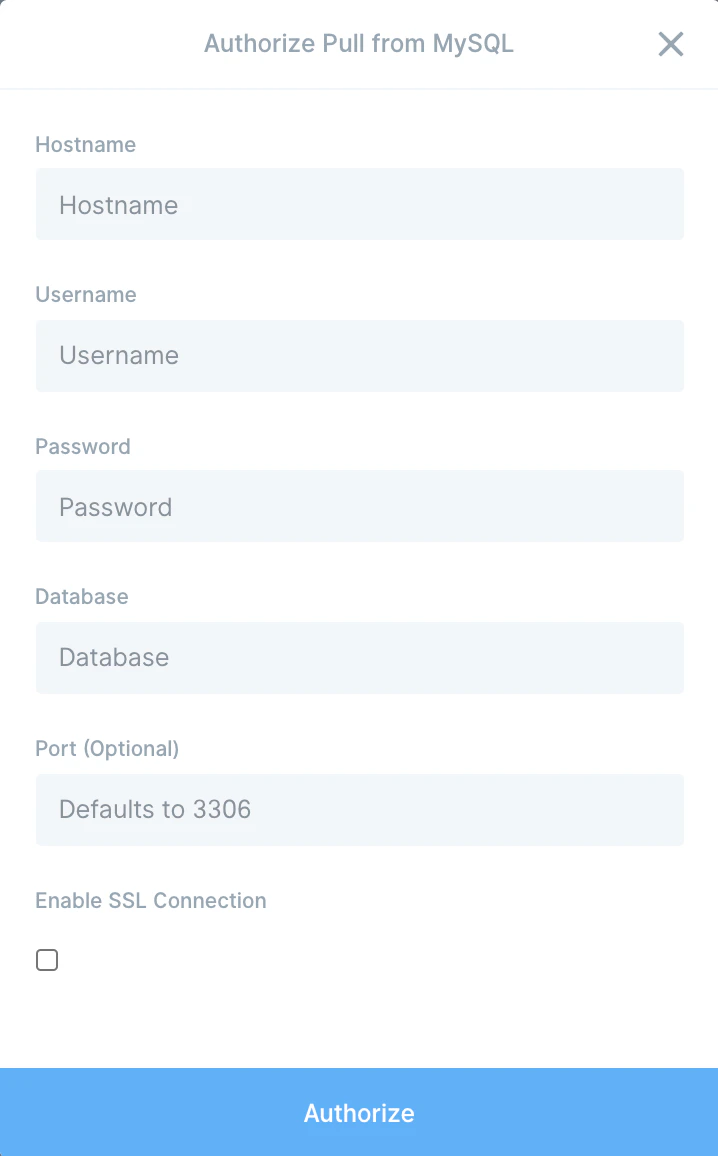 If your database doesn't require a value (a password, for example), leave that field blank. If you're not sure where to find these values, check your connection string or ask your database administrator.
Pick a table from the dropdown. By default the step runs `select *` against that table.
### Configure your settings
To narrow the result set, write SQL in the **Query (optional)** field. A targeted query keeps the pull fast and avoids dragging entire historical tables into the flow.
Two AI buttons live next to the query field:
* **Help write query** — describe the data you want in plain language (for example, "Show me the last 30 days of shipped orders") and AI drafts the SQL for you.
* **Optimize query** — paste an existing query to fix syntax errors, improve performance, or refine the logic.
Both buttons open the AI chat where you can keep refining until the query is right.
## Send to MySQL
The **Send to MySQL** step inserts, updates, or upserts rows in a remote MySQL database, useful for syncing reconciled data back into operational tables or pushing transformed records to a reporting database.
### How to authenticate
Add a **Send to MySQL** step to your flow and double-click to open it.
Click **Authorize** and enter your connection details. The step defaults to port 3306 if no port is provided.
If your database doesn't require a value (a password, for example), leave that field blank. If you're not sure where to find these values, check your connection string or ask your database administrator.
Pick a table from the dropdown. By default the step runs `select *` against that table.
### Configure your settings
To narrow the result set, write SQL in the **Query (optional)** field. A targeted query keeps the pull fast and avoids dragging entire historical tables into the flow.
Two AI buttons live next to the query field:
* **Help write query** — describe the data you want in plain language (for example, "Show me the last 30 days of shipped orders") and AI drafts the SQL for you.
* **Optimize query** — paste an existing query to fix syntax errors, improve performance, or refine the logic.
Both buttons open the AI chat where you can keep refining until the query is right.
## Send to MySQL
The **Send to MySQL** step inserts, updates, or upserts rows in a remote MySQL database, useful for syncing reconciled data back into operational tables or pushing transformed records to a reporting database.
### How to authenticate
Add a **Send to MySQL** step to your flow and double-click to open it.
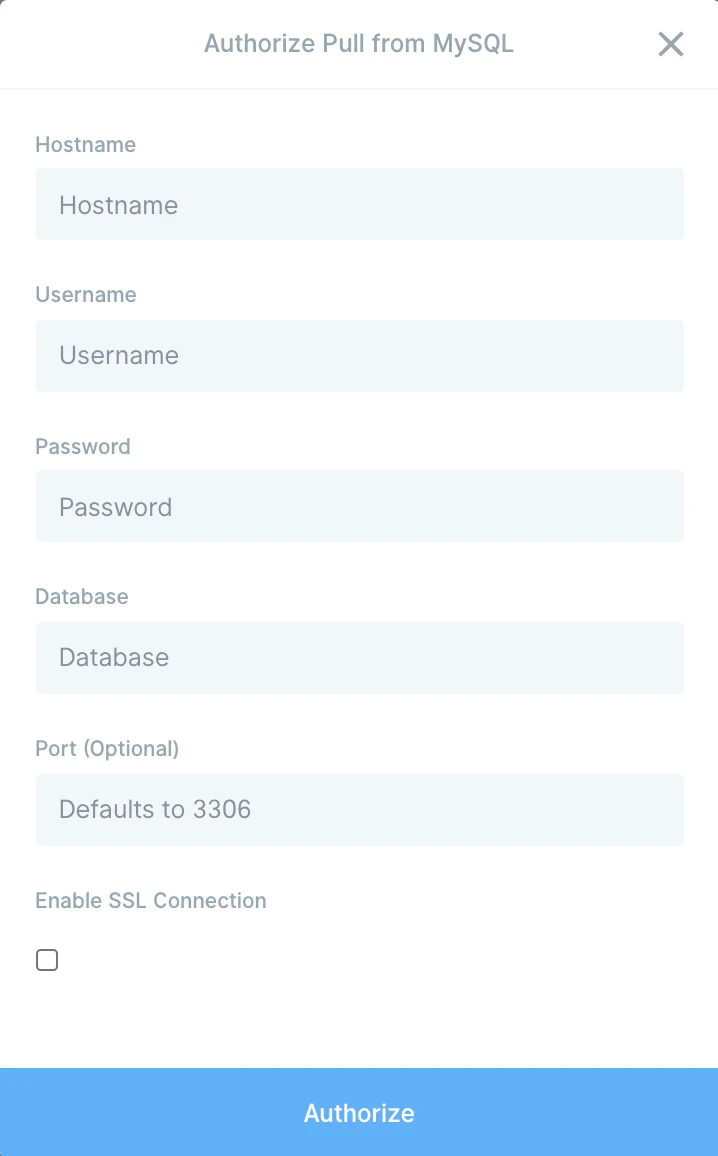
Click **Authorize** and enter your connection details. The step defaults to port 3306 if no port is provided.
 ### Configure your settings
Once connected, pick the destination table from the dropdown.
**Maximum Connections** — defaults to 20. Parabola splits your rows across this many concurrent connections to write faster. Every database has a maximum number of connections it accepts, so set Parabola's value to no more than 50–60% of that ceiling. Above the ceiling and the step errors out; at the ceiling and nothing else can connect to the database while the flow runs. Talk to whoever owns the database if you're not sure.
**Operations** — pick how rows should land:
* **Insert** — adds new rows. Make sure duplicates are okay; Parabola won't dedupe for you.
* **Upsert** — updates existing rows where a primary key matches, inserts the rest. Requires a unique identifier column on the database table and a matching column in your Parabola data.
* **Update** — only updates existing rows. Same primary-key requirement as upsert. Rows that don't match are skipped.
After picking the operation, map your Parabola columns to the columns in your MySQL table. Unmapped columns can stay blank.
### How errors are handled
Send to MySQL processes rows top to bottom. Unlike most Parabola export steps, it doesn't halt on a row failure. It logs the error, skips the row, and keeps going. If every row succeeds the step finishes in a normal state; if any row was skipped due to errors the step finishes in a failure state with the bad rows logged.
## Available data
The MySQL integration works against any database the connection has access to:
* **Pull**: any table or view in the connected database, plus arbitrary SQL queries (joins, aggregations, window functions, subqueries).
* **Send**: any table the connection has insert/update privileges on.
* **AI query helpers** for drafting and optimizing SQL inside the step.
## Common use cases
* **Build reports that combine app data with marketing and finance**: Pull from MySQL, join with [Shopify](/product/integration/shopify) orders, [Klaviyo](/product/integration/klaviyo) engagement, and [Stripe](/product/integration/stripe) payouts, and drop the result in [Google Drive](/product/integration/google-drive) or [Smartsheet](/product/integration/smartsheet) on a schedule.
* **Push reconciled data into a reporting database**: Clean and join data from across the business in Parabola, then write the result back into a MySQL reporting table for BI tools to consume.
* **Move data from MySQL into a warehouse**: Pull from MySQL and push to [Snowflake](/product/integration/snowflake), [BigQuery](/product/integration/bigquery), or [Redshift](/product/integration/redshift) so analysts can query production data alongside the rest of the stack.
* **Sync product or customer data to marketing tools**: Pull users from MySQL and push them into [Mailchimp](/product/integration/mailchimp), [HubSpot](/product/integration/hubspot), or [Klaviyo](/product/integration/klaviyo) so lifecycle campaigns stay current without engineering work.
* **Trigger ops alerts on database conditions**: Run a query against MySQL on a schedule, then send a [Slack](/product/integration/slack) alert when a count, sum, or status flag crosses a threshold.
* **Reconcile internal MySQL data with vendor systems**: Compare MySQL records with data from [NetSuite](/product/integration/netsuite), [QuickBooks Online](/product/integration/quickbooks-online), or [Fulfil](/product/integration/fulfil) to catch sync gaps before close.
## Tips for using Parabola with MySQL
* **Filter in SQL, not in Parabola.** Add `where` clauses, date ranges, and column selection to your query so only the rows you need cross the wire. Faster runs and cleaner downstream logic.
* **Use `limit` while building.** Add `limit 100` while you're wiring up the flow. Remove it before scheduling so the production run pulls everything.
* **Allow-list Parabola's IPs.** If your MySQL server restricts inbound traffic, add Parabola's IP ranges to your firewall or security group so the connection isn't blocked.
* **Cast types before sending.** Send to MySQL writes everything as strings. Make sure target columns accept strings, or cast on the database side. Null values arrive as empty strings, not nulls.
* **Match column names exactly.** Use a **Rename columns** step before sending so Parabola column names line up with the MySQL table. Mismatches cause skipped rows.
* **Match cadence to use case.** Every 15 minutes for ops dashboards, daily for finance reports, weekly for cohort analysis.
## FAQ
### Can Parabola write null values to MySQL?
No. The Send to MySQL step writes empty strings instead of nulls. If your column needs true `NULL`, write the row, then run an `UPDATE ... SET column = NULL WHERE column = ''` on the database side, or handle the conversion in a stored procedure on the destination.
### Does Parabola support SSL connections to MySQL?
Connection encryption depends on the server's configuration. For databases that require SSL, use the connection-string options exposed in the auth modal. If your setup needs a tunnel or specific cert handling, contact [help@parabola.io](mailto:help@parabola.io) for guidance.
### How do I send only changed rows to MySQL?
Use the **Upsert** operation with a primary key, or filter rows in Parabola to only the changed records before the Send to MySQL step. Many teams pull a snapshot of the destination, diff it against the new data, and only send rows that differ.
### Why does the step skip some rows instead of failing?
Send to MySQL is designed not to halt on a single bad row. It logs the error, skips the row, and continues. The step ends in a failure state if any row was skipped, with the errors visible in the run log so you can fix and re-run.
### Can I run multiple statements in the Pull query?
The Pull from MySQL step expects a single query. Wrap multi-statement logic in a view or stored procedure on the database side, then pull from the view, or chain multiple Pull steps and join in Parabola.
***
With MySQL and Parabola connected, the queries your team runs by hand every week, the exports they paste into spreadsheets, and the manual writebacks into operational tables all become flows that run on a schedule.
### Configure your settings
Once connected, pick the destination table from the dropdown.
**Maximum Connections** — defaults to 20. Parabola splits your rows across this many concurrent connections to write faster. Every database has a maximum number of connections it accepts, so set Parabola's value to no more than 50–60% of that ceiling. Above the ceiling and the step errors out; at the ceiling and nothing else can connect to the database while the flow runs. Talk to whoever owns the database if you're not sure.
**Operations** — pick how rows should land:
* **Insert** — adds new rows. Make sure duplicates are okay; Parabola won't dedupe for you.
* **Upsert** — updates existing rows where a primary key matches, inserts the rest. Requires a unique identifier column on the database table and a matching column in your Parabola data.
* **Update** — only updates existing rows. Same primary-key requirement as upsert. Rows that don't match are skipped.
After picking the operation, map your Parabola columns to the columns in your MySQL table. Unmapped columns can stay blank.
### How errors are handled
Send to MySQL processes rows top to bottom. Unlike most Parabola export steps, it doesn't halt on a row failure. It logs the error, skips the row, and keeps going. If every row succeeds the step finishes in a normal state; if any row was skipped due to errors the step finishes in a failure state with the bad rows logged.
## Available data
The MySQL integration works against any database the connection has access to:
* **Pull**: any table or view in the connected database, plus arbitrary SQL queries (joins, aggregations, window functions, subqueries).
* **Send**: any table the connection has insert/update privileges on.
* **AI query helpers** for drafting and optimizing SQL inside the step.
## Common use cases
* **Build reports that combine app data with marketing and finance**: Pull from MySQL, join with [Shopify](/product/integration/shopify) orders, [Klaviyo](/product/integration/klaviyo) engagement, and [Stripe](/product/integration/stripe) payouts, and drop the result in [Google Drive](/product/integration/google-drive) or [Smartsheet](/product/integration/smartsheet) on a schedule.
* **Push reconciled data into a reporting database**: Clean and join data from across the business in Parabola, then write the result back into a MySQL reporting table for BI tools to consume.
* **Move data from MySQL into a warehouse**: Pull from MySQL and push to [Snowflake](/product/integration/snowflake), [BigQuery](/product/integration/bigquery), or [Redshift](/product/integration/redshift) so analysts can query production data alongside the rest of the stack.
* **Sync product or customer data to marketing tools**: Pull users from MySQL and push them into [Mailchimp](/product/integration/mailchimp), [HubSpot](/product/integration/hubspot), or [Klaviyo](/product/integration/klaviyo) so lifecycle campaigns stay current without engineering work.
* **Trigger ops alerts on database conditions**: Run a query against MySQL on a schedule, then send a [Slack](/product/integration/slack) alert when a count, sum, or status flag crosses a threshold.
* **Reconcile internal MySQL data with vendor systems**: Compare MySQL records with data from [NetSuite](/product/integration/netsuite), [QuickBooks Online](/product/integration/quickbooks-online), or [Fulfil](/product/integration/fulfil) to catch sync gaps before close.
## Tips for using Parabola with MySQL
* **Filter in SQL, not in Parabola.** Add `where` clauses, date ranges, and column selection to your query so only the rows you need cross the wire. Faster runs and cleaner downstream logic.
* **Use `limit` while building.** Add `limit 100` while you're wiring up the flow. Remove it before scheduling so the production run pulls everything.
* **Allow-list Parabola's IPs.** If your MySQL server restricts inbound traffic, add Parabola's IP ranges to your firewall or security group so the connection isn't blocked.
* **Cast types before sending.** Send to MySQL writes everything as strings. Make sure target columns accept strings, or cast on the database side. Null values arrive as empty strings, not nulls.
* **Match column names exactly.** Use a **Rename columns** step before sending so Parabola column names line up with the MySQL table. Mismatches cause skipped rows.
* **Match cadence to use case.** Every 15 minutes for ops dashboards, daily for finance reports, weekly for cohort analysis.
## FAQ
### Can Parabola write null values to MySQL?
No. The Send to MySQL step writes empty strings instead of nulls. If your column needs true `NULL`, write the row, then run an `UPDATE ... SET column = NULL WHERE column = ''` on the database side, or handle the conversion in a stored procedure on the destination.
### Does Parabola support SSL connections to MySQL?
Connection encryption depends on the server's configuration. For databases that require SSL, use the connection-string options exposed in the auth modal. If your setup needs a tunnel or specific cert handling, contact [help@parabola.io](mailto:help@parabola.io) for guidance.
### How do I send only changed rows to MySQL?
Use the **Upsert** operation with a primary key, or filter rows in Parabola to only the changed records before the Send to MySQL step. Many teams pull a snapshot of the destination, diff it against the new data, and only send rows that differ.
### Why does the step skip some rows instead of failing?
Send to MySQL is designed not to halt on a single bad row. It logs the error, skips the row, and continues. The step ends in a failure state if any row was skipped, with the errors visible in the run log so you can fix and re-run.
### Can I run multiple statements in the Pull query?
The Pull from MySQL step expects a single query. Wrap multi-statement logic in a view or stored procedure on the database side, then pull from the view, or chain multiple Pull steps and join in Parabola.
***
With MySQL and Parabola connected, the queries your team runs by hand every week, the exports they paste into spreadsheets, and the manual writebacks into operational tables all become flows that run on a schedule.