> ## Documentation Index
> Fetch the complete documentation index at: https://parabola.io/docs/llms.txt
> Use this file to discover all available pages before exploring further.
# Pull data from NetSuite via Saved Search
> Pull NetSuite saved search results into Prowork: selecting a search type, finding internal IDs, joined fields, and fixes for the most common saved search issues.
Once your [NetSuite authorization](/docs/product/integration/netsuite) is set up, you can pull data into Prowork using any saved search built in the NetSuite UI. Multiple saved searches, across different search types, can be configured in a single flow. This page covers how to select and run a saved search, how to find a search's internal ID, and the issues customers run into most often.
## Selecting and running a saved search
Open the **Pull from NetSuite** step on your canvas.
Select the **search type** that matches your saved search (Transaction, Item, Customer, Vendor, Employee, etc.).
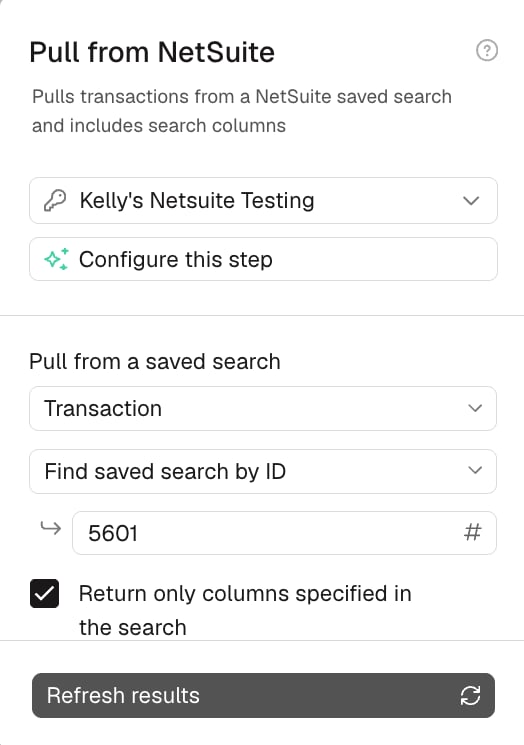
Select the specific **saved search** from the dropdown, or type its **Name** or internal **ID** directly.
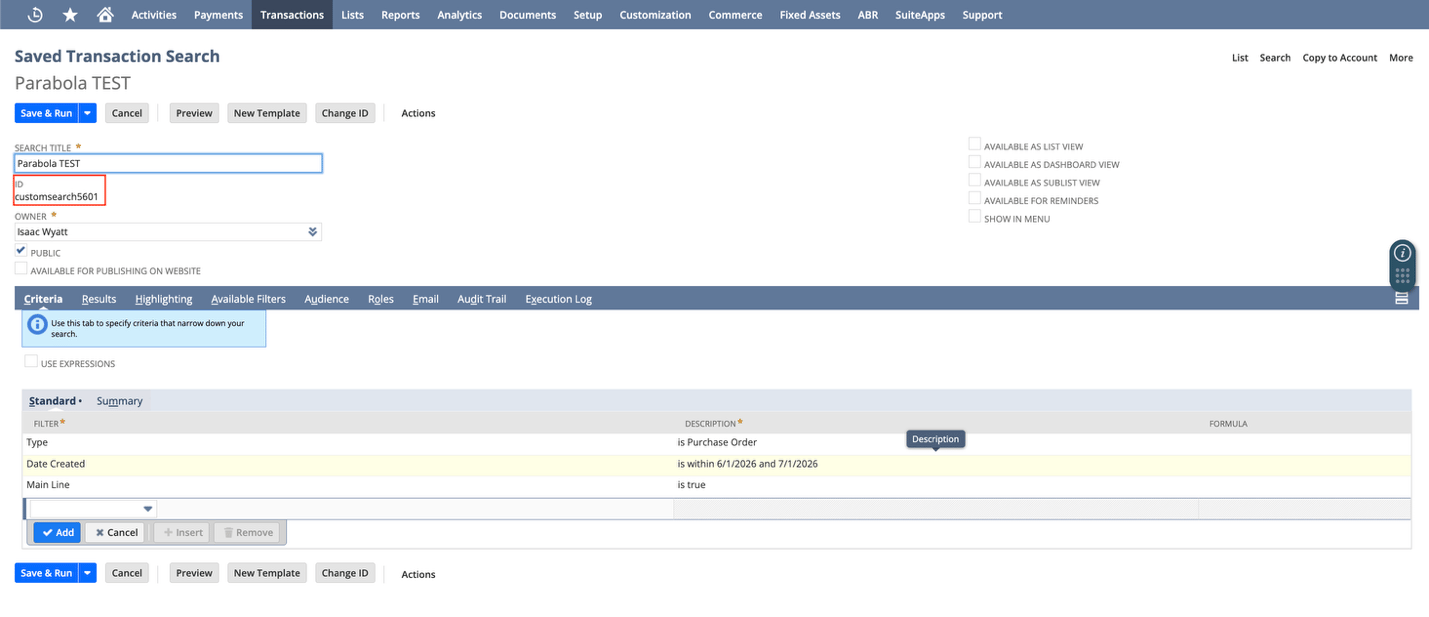
*Use the ID if you have 1000+ saved searches. Find it in NetSuite, just below the search title (e.g. `customsearch5601`).*
 Click **Update Results** or **Refresh Results** at the bottom to load results.
 **Which search type should I use?** Match the search type in the step to the record you're actually querying:
| What you need | Search type |
| ----------------------- | --------------- |
| Orders, invoices, bills | **Transaction** |
| Products, SKUs | **Item** |
| Customers, accounts | **Customer** |
| Vendors, suppliers | **Vendor** |
| Employees | **Employee** |
If you're unsure, open the saved search in NetSuite and check which type it was created under. The type you select in the step must match.
The **Return only columns specified in the search** checkbox controls whether Prowork returns every available column or just the ones included in your NetSuite search. Leave it unchecked if you want additional fields for the same records without editing the search in NetSuite.
The search type you select in Prowork must match the type the search was built under in NetSuite. This is one of the most common reasons a search won't load. See [Common issues](#common-issues) below.
## Common issues
Start here for the full list of issues and their potential causes.
| Issue | Potential causes |
| -------------------------------------------------------------------------------------------------------------------------- | ----------------------------------------------------------------------------------------------------------------------------------------------------------------------------------------------------------------------------------------------------------------------------------------------------------------------------------------------------------------------------------------------------------------------------------------------------- |
| [Issue 1: Returning an error](#issue-1-returning-an-error) | • **Summary results**: a field's Summary Type is set to Group, Sum, Count, Max, or Min, instead of None.
**Which search type should I use?** Match the search type in the step to the record you're actually querying:
| What you need | Search type |
| ----------------------- | --------------- |
| Orders, invoices, bills | **Transaction** |
| Products, SKUs | **Item** |
| Customers, accounts | **Customer** |
| Vendors, suppliers | **Vendor** |
| Employees | **Employee** |
If you're unsure, open the saved search in NetSuite and check which type it was created under. The type you select in the step must match.
The **Return only columns specified in the search** checkbox controls whether Prowork returns every available column or just the ones included in your NetSuite search. Leave it unchecked if you want additional fields for the same records without editing the search in NetSuite.
The search type you select in Prowork must match the type the search was built under in NetSuite. This is one of the most common reasons a search won't load. See [Common issues](#common-issues) below.
## Common issues
Start here for the full list of issues and their potential causes.
| Issue | Potential causes |
| -------------------------------------------------------------------------------------------------------------------------- | ----------------------------------------------------------------------------------------------------------------------------------------------------------------------------------------------------------------------------------------------------------------------------------------------------------------------------------------------------------------------------------------------------------------------------------------------------- |
| [Issue 1: Returning an error](#issue-1-returning-an-error) | • **Summary results**: a field's Summary Type is set to Group, Sum, Count, Max, or Min, instead of None.
• **Not public**: the search isn't marked Public in NetSuite.
• **Wrong search type**: doesn't match the type the search was created under in NetSuite.
• **Role permissions**: the role lacks access to the search's record type.
• **Incorrect search ID**: the ID typed into "Find saved search by ID" doesn't exist. |
| [Issue 2: Returning zero rows or results](#issue-2-returning-zero-rows-or-results) | • **Role permissions**: the role has no access to any record type in the search. |
| [Issue 3: Returning incomplete data (missing rows or columns)](#issue-3-returning-incomplete-data-missing-rows-or-columns) | • **Role permissions (rows)**: the role is missing access to some record types in the search.
• **Unsupported transaction type**: included in the search but not supported via saved search at all.
• **Empty column**: no data in any row of the search.
• **Formula field**: not returned to Prowork at all.
• **Missing column permissions**: typically for a custom field. |
| [Issue 4: Returning incorrect values or field names](#issue-4-returning-incorrect-values-or-field-names) | • **Joined fields**: return an internal ID instead of a name.
• **Custom list fields**: return an internal ID with no fix available in the search itself.
• **Column renamed on pull**: the data is present but under a header you didn't expect. |
### Issue 1: Returning an error
 * **Summary results:** a field's Summary Type (Group, Sum, Count, Max, or Min) is set instead of None. Open the search's **Results** tab in NetSuite, set every field's Summary Type to **None**, and re-run.
*Need the aggregated view? Recreate it in Prowork afterward with a Sum by group or Merge duplicate rows step. Best practice: use a separate saved search for Prowork rather than an internal report.*
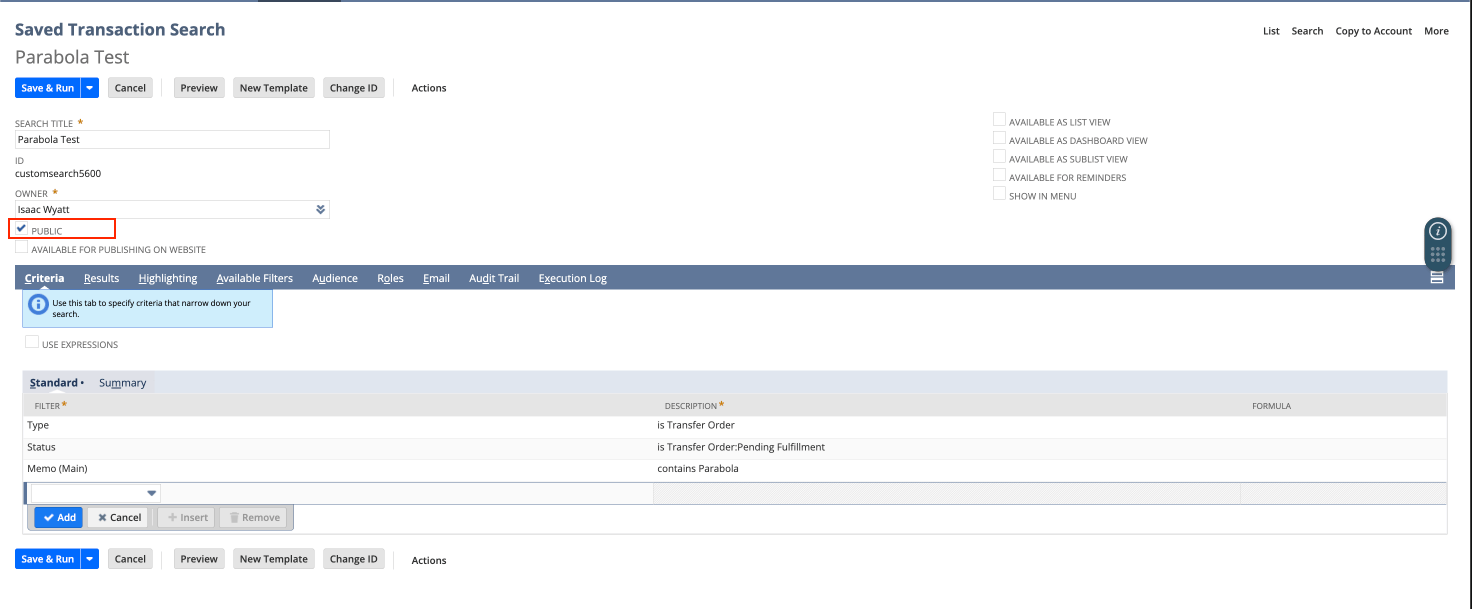
* **Not public:** open the search in NetSuite and confirm the **Public** checkbox is checked.
* **Summary results:** a field's Summary Type (Group, Sum, Count, Max, or Min) is set instead of None. Open the search's **Results** tab in NetSuite, set every field's Summary Type to **None**, and re-run.
*Need the aggregated view? Recreate it in Prowork afterward with a Sum by group or Merge duplicate rows step. Best practice: use a separate saved search for Prowork rather than an internal report.*
* **Not public:** open the search in NetSuite and confirm the **Public** checkbox is checked.
 * **Wrong search type:** the type selected in Prowork must match the type the search was created under in NetSuite.
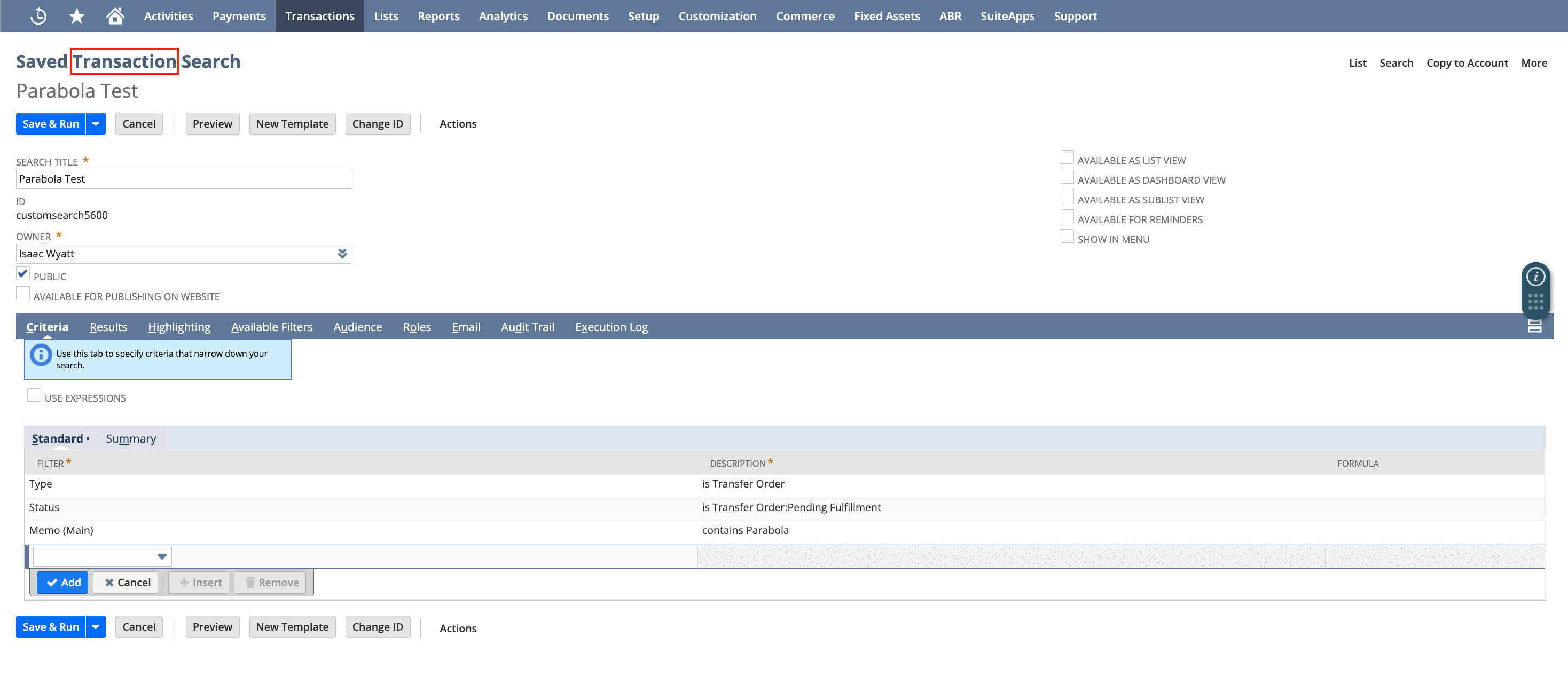 * **Role permissions:** the role may not have access to the search's underlying record type (e.g. it needs **Bill** permission, not just **Find Transaction**, if all the transactions in the search are Bills).
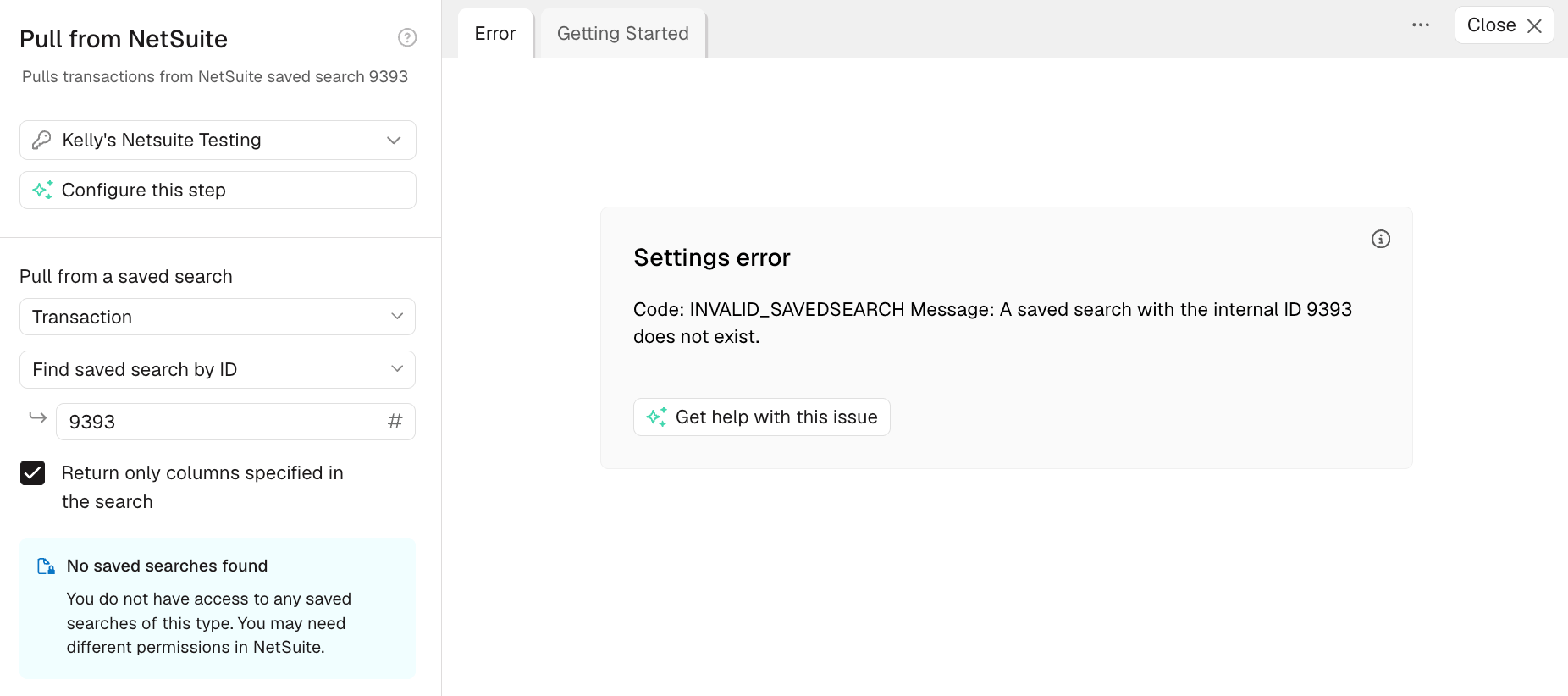
* **Incorrect search ID:** a mistyped or nonexistent ID entered in **Find saved search by ID** shows an error.
### Issue 2: Returning zero rows or results
* **Role permissions:** the role may not have access to the search's underlying record type (e.g. it needs **Bill** permission, not just **Find Transaction**, if all the transactions in the search are Bills).
* **Incorrect search ID:** a mistyped or nonexistent ID entered in **Find saved search by ID** shows an error.
### Issue 2: Returning zero rows or results
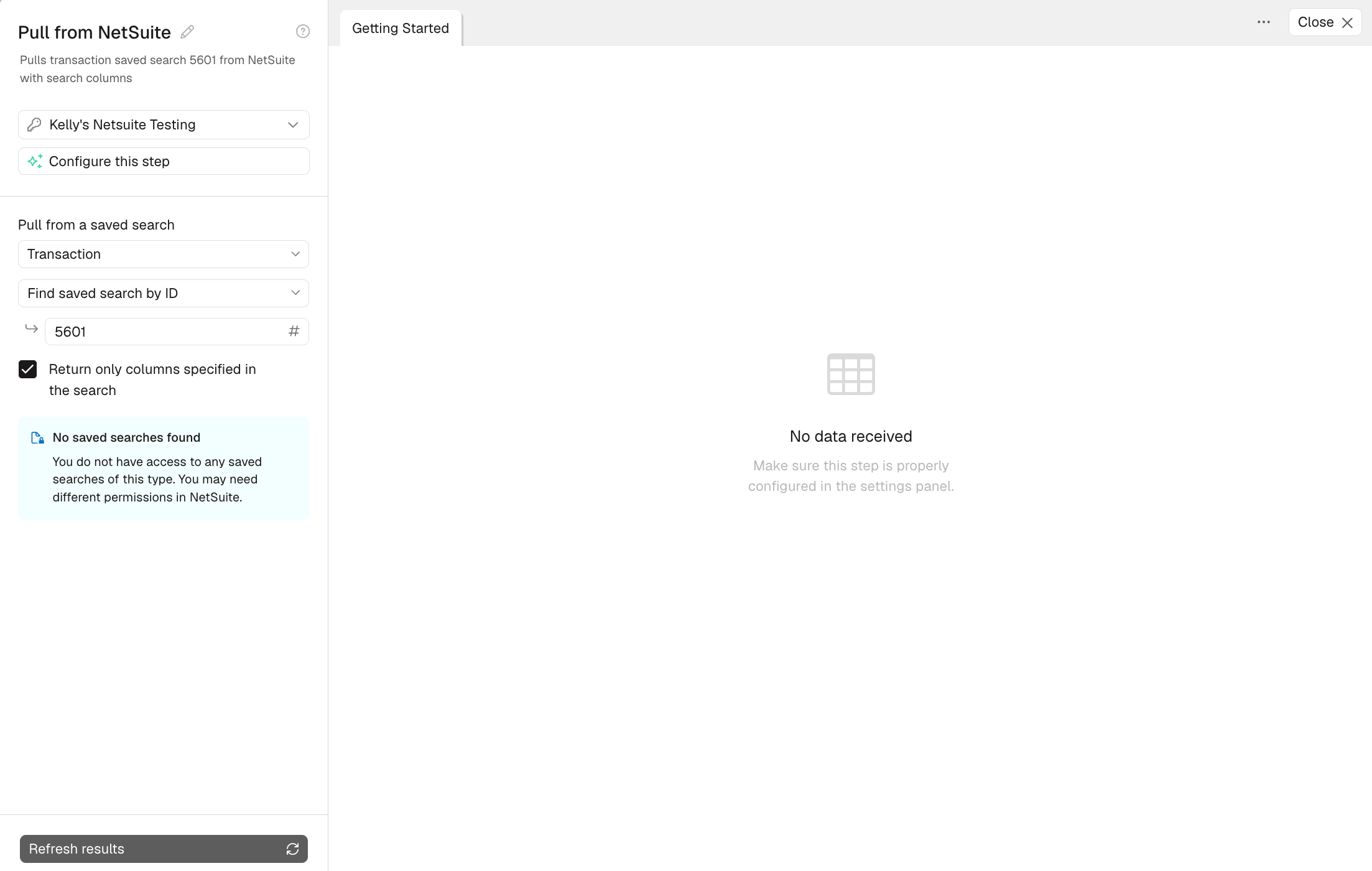 * **Role permissions:** the role has no access to any record type in the search, so Prowork shows the error: No data received. Update the role's permissions to fix it.
### Issue 3: Returning incomplete data (missing rows or columns)
* **Role permissions (rows):** the role can't see some record types in the search (e.g. lacks **Bill** permission when some transactions are Bills), so those rows are silently dropped. Update the role's permissions to cover every record type included in the search.
*To confirm, compare NetSuite's row count directly against Prowork's; a gap points to permissions.*
* **Unsupported transaction type:** some transaction types can't be pulled via saved search regardless of role permissions. Remove that type from the search, or pull it separately via [SuiteQL](/docs/product/integration/suiteql) if it's supported there:
Blanket Purchase Order · CCard Refund · Commission · Credit Card · Currency Revaluation · Customer Payment Authorization · Deprecated Custom Transaction · Finance Charge · Fulfillment Request · GL Impact Adjustment · Inventory Count · Inventory Distribution · Inventory Status Change · Inventory Worksheet · Liability Adjustment · Ownership Transfer · Payroll Adjustment · Payroll Liability Check · Period End Journal · Purchase Contract · Request For Quote · Revenue Arrangement · Revenue Commitment · Revenue Commitment Reversal · Revenue Contract · Sales Tax Payment · Statement Charge · Store Pickup Fulfillment · System Journal · Tax Liability Cheque · Tegata Payable · Tegata Receivable · Transfer · Vendor Request For Quote
* **Empty column:** a column with no data in any row gets dropped from the results entirely. No action needed, or swap in a column that does have data.
* **Formula field:** formula-based fields aren't returned to Prowork at all. Recreate the calculation as a step in your flow instead.
* **Missing column permissions:** typically for a custom field. Update the role to grant access to it under **Lists** and **Custom Records**.
### Issue 4: Returning incorrect values or field names
* **Role permissions:** the role has no access to any record type in the search, so Prowork shows the error: No data received. Update the role's permissions to fix it.
### Issue 3: Returning incomplete data (missing rows or columns)
* **Role permissions (rows):** the role can't see some record types in the search (e.g. lacks **Bill** permission when some transactions are Bills), so those rows are silently dropped. Update the role's permissions to cover every record type included in the search.
*To confirm, compare NetSuite's row count directly against Prowork's; a gap points to permissions.*
* **Unsupported transaction type:** some transaction types can't be pulled via saved search regardless of role permissions. Remove that type from the search, or pull it separately via [SuiteQL](/docs/product/integration/suiteql) if it's supported there:
Blanket Purchase Order · CCard Refund · Commission · Credit Card · Currency Revaluation · Customer Payment Authorization · Deprecated Custom Transaction · Finance Charge · Fulfillment Request · GL Impact Adjustment · Inventory Count · Inventory Distribution · Inventory Status Change · Inventory Worksheet · Liability Adjustment · Ownership Transfer · Payroll Adjustment · Payroll Liability Check · Period End Journal · Purchase Contract · Request For Quote · Revenue Arrangement · Revenue Commitment · Revenue Commitment Reversal · Revenue Contract · Sales Tax Payment · Statement Charge · Store Pickup Fulfillment · System Journal · Tax Liability Cheque · Tegata Payable · Tegata Receivable · Transfer · Vendor Request For Quote
* **Empty column:** a column with no data in any row gets dropped from the results entirely. No action needed, or swap in a column that does have data.
* **Formula field:** formula-based fields aren't returned to Prowork at all. Recreate the calculation as a step in your flow instead.
* **Missing column permissions:** typically for a custom field. Update the role to grant access to it under **Lists** and **Custom Records**.
### Issue 4: Returning incorrect values or field names
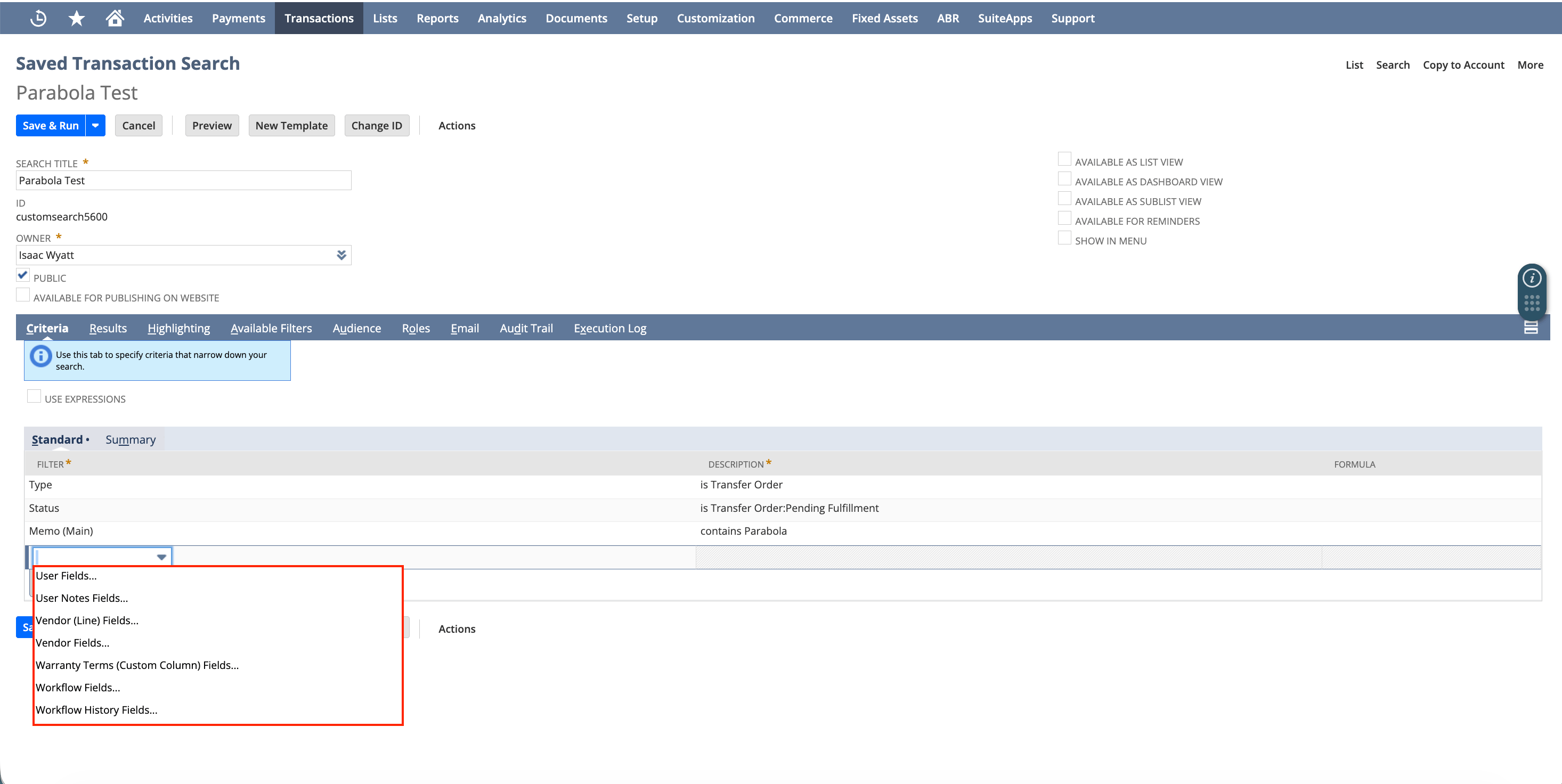 * **Joined fields:** NetSuite returns only the internal ID for related records (vendor, location, etc.), not the name. Add the object's **Name** subfield instead (look for the entry ending in "...Fields...", e.g. "Vendor Fields...") and uncheck **Return only columns specified in the search**.
*If it's still coming in as raw JSON (e.g. `{"attributes":{"internalId":"101"},"name":"DTC"}`), flatten it with an AI step using the prompt "expand nested fields to columns."*
* **Joined fields:** NetSuite returns only the internal ID for related records (vendor, location, etc.), not the name. Add the object's **Name** subfield instead (look for the entry ending in "...Fields...", e.g. "Vendor Fields...") and uncheck **Return only columns specified in the search**.
*If it's still coming in as raw JSON (e.g. `{"attributes":{"internalId":"101"},"name":"DTC"}`), flatten it with an AI step using the prompt "expand nested fields to columns."*
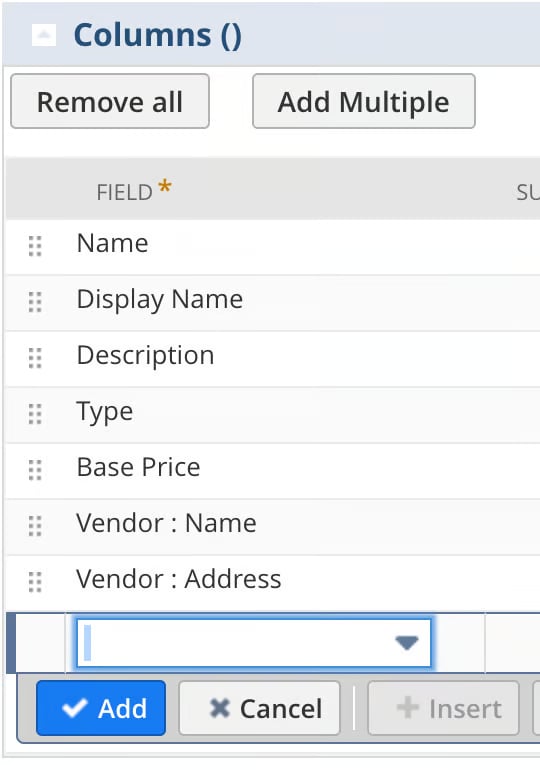 Alternatively, run separate searches and join the results with a **Combine tables** step:
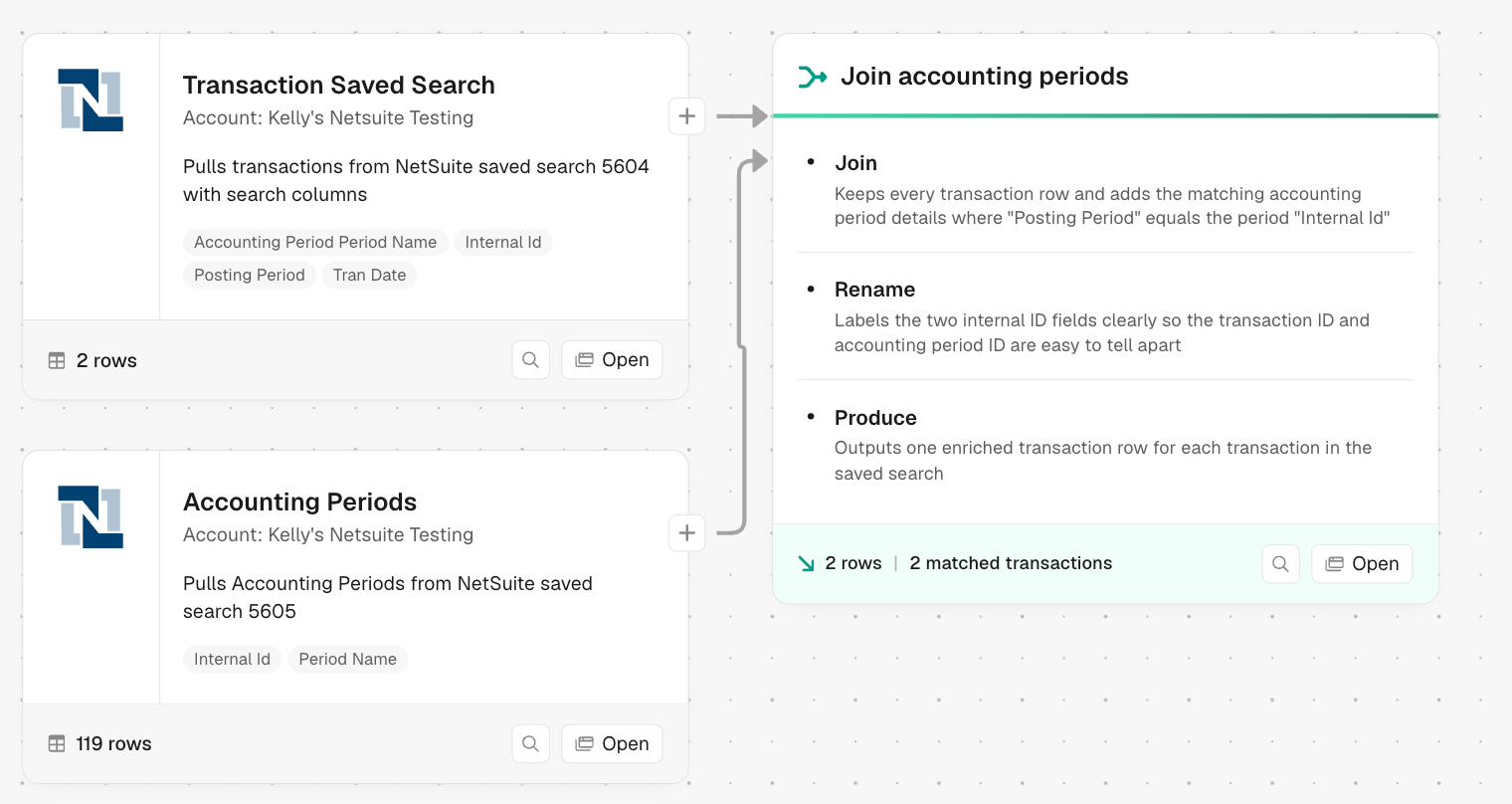 * **Custom list fields:** a custom field with a set list of options (e.g. "Color" with Mauve, Ruby, Emerald) always returns the raw internal ID. Export a mapping of IDs to display names from NetSuite, then join it back with a **Combine tables** step. Custom fields using a free-text box pull in normally and aren't affected.
* **Column renamed on pull:** the data is present but under a header you didn't expect. Check your other columns' values, then rename the column in Prowork once you find it.
### Pulling inventory balances
NetSuite's SOAP API doesn't expose **Inventory Balance** as a standard search object, so you can't pull it directly with a saved search. Instead, build an **Item** search and add these location-level result fields to get per-location quantities for each item:
* **Inventory Location** (the location name)
* **Location On Hand** (units physically in stock)
* **Location Available** (on hand minus committed)
* **Location Committed** (units reserved on open orders)
* **Location Back Ordered** (units on back order)
* **Location On Order** (units on open purchase orders)
Each row represents one item-location combination, giving you the same breakdown you'd expect from an Inventory Balance report.
## Row limits and search timeouts
There's no hard row limit, but very large searches can time out before the data fully loads. This is a NetSuite API constraint, not a Prowork limit. If you hit it:
* **Narrow the search criteria** with filters like date range, status, location, or subsidiary.
* **Split one large search into several smaller ones** (for example, by month or subsidiary) and stack the results back together in Prowork.
* **Use a scheduled email export.** NetSuite can email a saved search's results as a CSV on a schedule. Receive that email with an **Extract from Email** step, which avoids the timeout. This works well for large reference datasets that don't need real-time freshness.
* **Custom list fields:** a custom field with a set list of options (e.g. "Color" with Mauve, Ruby, Emerald) always returns the raw internal ID. Export a mapping of IDs to display names from NetSuite, then join it back with a **Combine tables** step. Custom fields using a free-text box pull in normally and aren't affected.
* **Column renamed on pull:** the data is present but under a header you didn't expect. Check your other columns' values, then rename the column in Prowork once you find it.
### Pulling inventory balances
NetSuite's SOAP API doesn't expose **Inventory Balance** as a standard search object, so you can't pull it directly with a saved search. Instead, build an **Item** search and add these location-level result fields to get per-location quantities for each item:
* **Inventory Location** (the location name)
* **Location On Hand** (units physically in stock)
* **Location Available** (on hand minus committed)
* **Location Committed** (units reserved on open orders)
* **Location Back Ordered** (units on back order)
* **Location On Order** (units on open purchase orders)
Each row represents one item-location combination, giving you the same breakdown you'd expect from an Inventory Balance report.
## Row limits and search timeouts
There's no hard row limit, but very large searches can time out before the data fully loads. This is a NetSuite API constraint, not a Prowork limit. If you hit it:
* **Narrow the search criteria** with filters like date range, status, location, or subsidiary.
* **Split one large search into several smaller ones** (for example, by month or subsidiary) and stack the results back together in Prowork.
* **Use a scheduled email export.** NetSuite can email a saved search's results as a CSV on a schedule. Receive that email with an **Extract from Email** step, which avoids the timeout. This works well for large reference datasets that don't need real-time freshness.