> ## Documentation Index
> Fetch the complete documentation index at: https://parabola.io/docs/llms.txt
> Use this file to discover all available pages before exploring further.
# Run another Parabola flow
> Trigger another Parabola flow from inside a flow. Pass file URLs and row context downstream to chain flows together or split a large flow into manageable pieces.
The **Run another Parabola flow** step triggers a different Parabola flow from inside the current one. Use it to chain flows together, split a large flow into pieces, or fan out work across many runs.
## Running other flows
Pick the flow you want to trigger. By default, no data passes through this step — it's just a trigger.
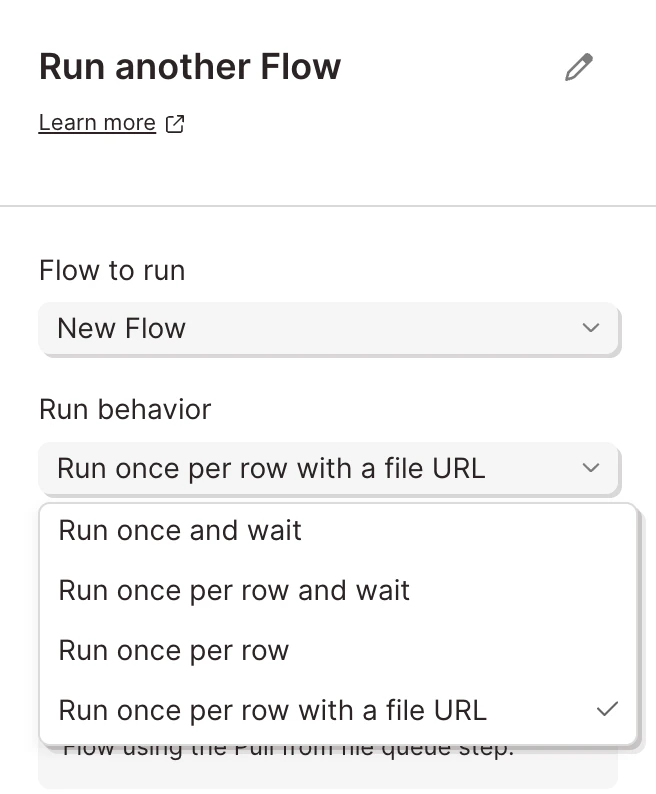 If you choose **Run once per row with a file URL**, data is passed to the downstream flow. The downstream flow reads it via the [**Pull from file queue**](/product/integration/pull-from-file-queue) step. On top of the file URL, every column from the originating row is "splatted" onto each row fetched downstream — so the second flow has full context from the first.
The **Run behavior** setting controls whether this step waits for the second flow to finish. Options that include `wait` block until the second flow completes; the rest fire-and-forget.
## Using this step in a flow
This step works with or without input arrows. Without input arrows, it runs first. With input arrows, it runs in normal flow order. The `per row` options require input arrows.
## Helpful tips
* **Available on the [Advanced plan](https://parabola.io/pricing)** only.
* **Use it to break up large flows.** When a single flow gets too tangled to debug, split it into upstream and downstream pieces and chain them with this step.
* **The downstream flow must be published.** If you don't see a flow in the dropdown, confirm it has a live version.
* **Per-row mode pairs with Pull from file queue.** If you need to process many files (PDFs, CSVs) in a single run, pair Run another flow's per-row mode with a downstream flow that starts with Pull from file queue.
## Related steps
* [Pull from file queue](/product/integration/pull-from-file-queue) — the downstream step that receives the file URL and row data
* [Send to Parabola Table](/product/integration/table) — to share data between flows via a persistent table instead of a per-row trigger
* [Webhooks](/product/integration/webhook) — for triggering Parabola flows from outside Parabola
If you choose **Run once per row with a file URL**, data is passed to the downstream flow. The downstream flow reads it via the [**Pull from file queue**](/product/integration/pull-from-file-queue) step. On top of the file URL, every column from the originating row is "splatted" onto each row fetched downstream — so the second flow has full context from the first.
The **Run behavior** setting controls whether this step waits for the second flow to finish. Options that include `wait` block until the second flow completes; the rest fire-and-forget.
## Using this step in a flow
This step works with or without input arrows. Without input arrows, it runs first. With input arrows, it runs in normal flow order. The `per row` options require input arrows.
## Helpful tips
* **Available on the [Advanced plan](https://parabola.io/pricing)** only.
* **Use it to break up large flows.** When a single flow gets too tangled to debug, split it into upstream and downstream pieces and chain them with this step.
* **The downstream flow must be published.** If you don't see a flow in the dropdown, confirm it has a live version.
* **Per-row mode pairs with Pull from file queue.** If you need to process many files (PDFs, CSVs) in a single run, pair Run another flow's per-row mode with a downstream flow that starts with Pull from file queue.
## Related steps
* [Pull from file queue](/product/integration/pull-from-file-queue) — the downstream step that receives the file URL and row data
* [Send to Parabola Table](/product/integration/table) — to share data between flows via a persistent table instead of a per-row trigger
* [Webhooks](/product/integration/webhook) — for triggering Parabola flows from outside Parabola