> ## Documentation Index
> Fetch the complete documentation index at: https://parabola.io/docs/llms.txt
> Use this file to discover all available pages before exploring further.
# Send emails by row
> Send one personalized email per row of your dataset using Parabola's Send emails by row step. Up to 75 emails per run, with merge tags from any column.
The **Send emails by row** step sends one email per row in your dataset, using the email address in a column you choose. It's the right step when you need to notify a list of recipients with personalized content — chargeback alerts to vendors, status updates to customers, daily summaries to store managers.
Up to **75 emails per run**. All messages send from `team@parabolamail.io` with a "Powered by Parabola" footer.
## Setting up the step
**Add the step** to your flow by dragging it onto the canvas.
Connect it to the step that holds your column of email addresses.
Open the step to configure settings.
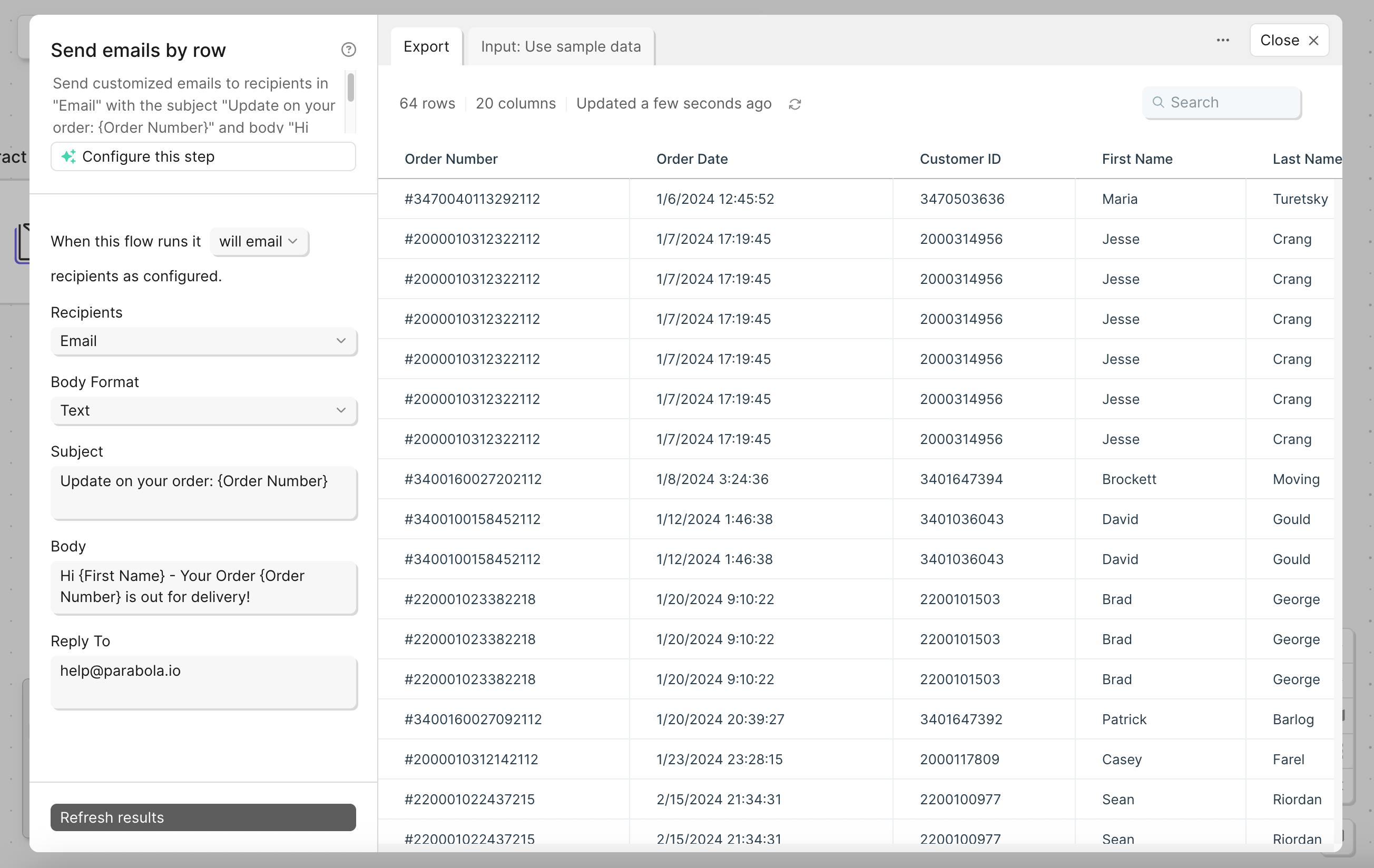
**Recipients:** pick the column with the email addresses.
**Body Format:** plain text or HTML.
**Subject and Body:** required. Personalize them with merge tags from other columns using `{curly braces}`.
**Reply To:** the address replies should go to.
 ## Using variables
Personalize subject and body with merge tags. Tags reference column names from the input table using `{curly braces}`.
For example, with columns named "Name" and "Order ID":
* **Subject:** `Your order {Order ID} has shipped`
* **Body:** `Hi {Name}, your order is on the way!`
Cell values can contain literal curly braces without breaking anything. Parabola only evaluates merge tags in the subject and body template fields, not in your data.
If you reference a tag that doesn't match a column, the error message tells you which tag is invalid and which field (subject or body) it's in.
## Helpful tips
* **HTML formatting:** select **HTML** in the Body Format. Common tags like `
## Using variables
Personalize subject and body with merge tags. Tags reference column names from the input table using `{curly braces}`.
For example, with columns named "Name" and "Order ID":
* **Subject:** `Your order {Order ID} has shipped`
* **Body:** `Hi {Name}, your order is on the way!`
Cell values can contain literal curly braces without breaking anything. Parabola only evaluates merge tags in the subject and body template fields, not in your data.
If you reference a tag that doesn't match a column, the error message tells you which tag is invalid and which field (subject or body) it's in.
## Helpful tips
* **HTML formatting:** select **HTML** in the Body Format. Common tags like `
`, ``, and `` are supported.
* **75-recipient limit per run.** Filter or batch upstream if your list is larger.
* **One email per row.** If you need to send a single email with a file attached to a fixed list, use [**Email a file attachment**](/product/integration/email-attachment) instead.
* **Watch for empty rows.** If the email column has blank cells, the step still tries to send. Filter blanks out with [**Filter rows**](/product/transform/filter-rows) first.
* **Schedules apply to the parent flow.** Pair this step with the flow's schedule trigger to send recurring digests.
## Related steps
* [Email a file attachment](/product/integration/email-attachment) — for one email with a file to a fixed recipient list
* [Generate CSV file](/product/integration/csv-file) — when recipients prefer a downloadable file over inline content
* [Filter rows](/product/transform/filter-rows) — to drop rows with missing email addresses before sending
* [Edit columns](/product/transform/edit-columns) — to build the subject or body content from raw fields
* [Send Slack message](/product/integration/slack) — when an internal channel is the better destination