# A new an improved way to Filter Rows!

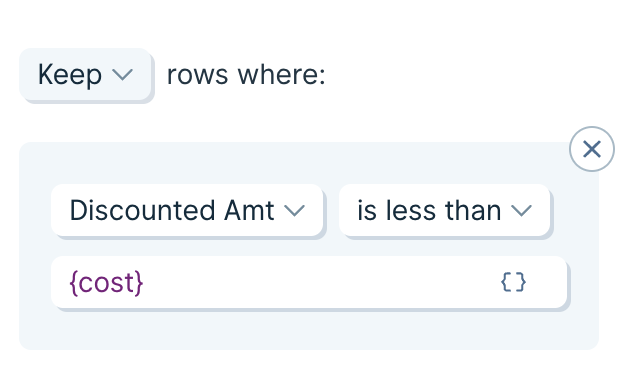
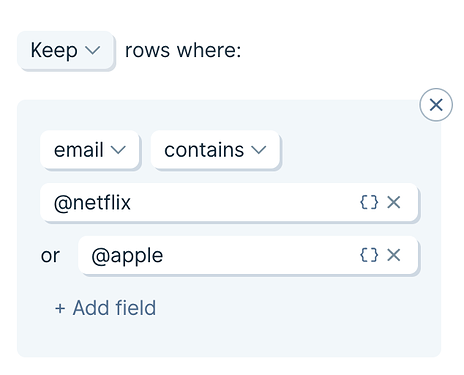
> <p id="">We’ve made two new updates to the <strong id="">Filter Rows step</strong> that we think we add even more power to your flows.</p><p id=""><strong id="">Add multiple criteria to single filter</strong></p><p id="">In the past, if you had a large list of criteria that you had to filter against, such as email domains to remove, you needed to add an individual rule for each criteria.</p><p id="">Now, the contains, not contains, is equal to, and is not equal to filter operations will <strong id="">accept multiple criteria</strong> fields.</p><p id="">‍</p><figure id="" class="w-richtext-figure-type-image w-richtext-align-fullwidth" style="max-width:464px" data-rt-type="image" data-rt-align="fullwidth" data-rt-max-width="464px"><div id=""><img id="" alt="Screen Shot 2022-07-12 at 1.53.02 PM" src="/images/cms/aHR0cHM6-663559c9207f91d5a1baa9e8_b291bb8dc83139b192c0ca53d2df8539f52adc83_2_464x375.png" width="auto" height="auto" loading="auto"></div></figure><p id=""><strong id="">Use merge tags in a filter criteria</strong></p><p id="">Previously, when you needed to compare one column to another, and the filter based on that comparison, you would use an Insert If Else Column step to perform the comparison, followed by a Filter Rows step to then filter based on that comparison (also creating an extra temporary column in the process).</p><p id="">Now, the Filter Rows step will accept <strong id="">merge tags</strong>. Enter any column name, wrapped in {curly braces}, to compare columns inside of a filter.</p><p id="">‍</p><figure id="" class="w-richtext-figure-type-image w-richtext-align-fullwidth" style="max-width:634px" data-rt-type="image" data-rt-align="fullwidth" data-rt-max-width="634px"><div id=""><img id="" alt="image" src="/images/cms/aHR0cHM6-663559c9207f91d5a1baaa0b_83bfff0d5c74f4353632ef2f2225c47a034af19b.png" width="auto" height="auto" loading="auto"></div></figure><p id="">‍</p>

Source: https://parabola.io/updates/a-new-an-improved-way-to-filter-rows