

Documentation Index
Fetch the complete documentation index at: https://parabola.io/docs/llms.txt
Use this file to discover all available pages before exploring further.
Version history is rolled out to select customers on our Advanced and Enterprise plans. If your organization is on one of these plans and you’d like access, reach out to your account manager or help@parabola.io.
Viewing your flow’s version history
You can view the version history for any flow by opening the Flow history panel from the upper right corner of the canvas and selecting the Version history tab. From here, you’ll see a list of versions grouped by day, with the most recent versions at the top.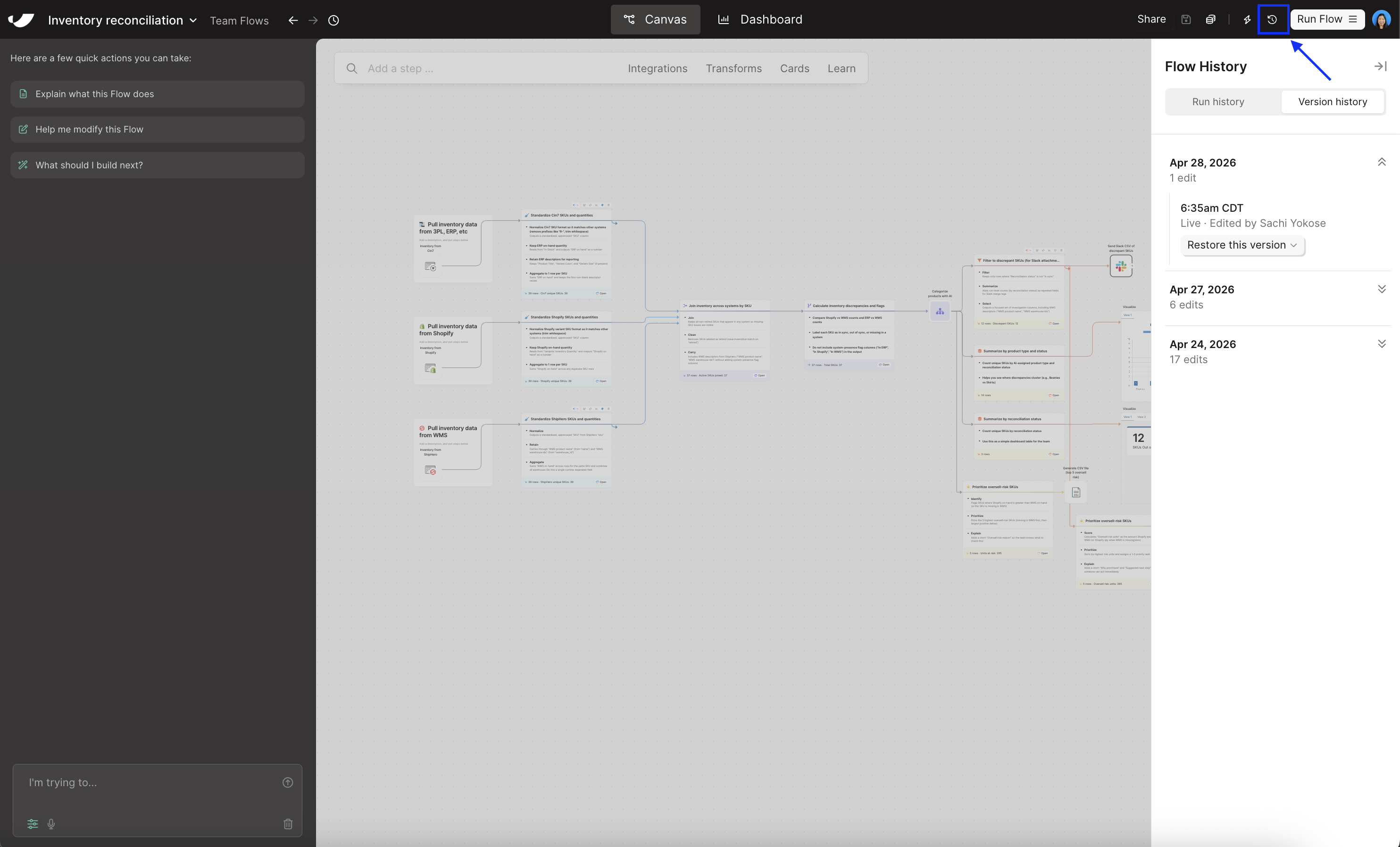
- The name of the user who made the changes
- The timestamp of the version
- Whether the changes were made on the live or draft version of the flow
- A note if the version was restored from an earlier one
Restoring a previous version
When you find a version you’d like to restore, click the dropdown below it. The available actions depend on whether you’re working in the live or draft version of the flow. From the live version of a flow, you can:- Restore this version — Overwrites the live version of your flow with the content from the selected version.
- Restore/replace as draft — Writes the content from the selected version to a new draft, or replaces your existing draft if you have one.
- Restore in a new flow — Creates a brand new flow with the content from the selected version. You’ll be redirected to the new flow once it’s created, and you’ll be set as the owner.
- Restore as draft / Replace draft — Writes the content from the selected version to a new draft, or replaces your existing draft if you have one.
- Restore in a new flow — Creates a brand new flow with the content from the selected version. You’ll be redirected to the new flow once it’s created, and you’ll be set as the owner.
Permissions
- Editors, content admins, and org admins can view version history and restore any version.
- Viewers can see the version history, but restore actions are disabled.
Retention
The current version of a live or draft flow is retained for the life of the flow. Once a version is superseded by a newer one, the prior version is retained for up to 30 days before being deleted.FAQs
What happens to version history if a teammate is deactivated or removed from the org?
What happens to version history if a teammate is deactivated or removed from the org?
Their name stays on any version entries they created. Version history is part of your organization’s audit trail, so we preserve attribution even after a user is removed — similar to how Notion, Figma, and other tools handle this.
What actually triggers a new version?
What actually triggers a new version?
Most changes that happen on the canvas create a snapshot — adding new steps, moving steps around, or modifying a card, to name a few. To keep your version history readable, we coalesce activity within a 5-minute window into a single entry.
Does undo (⌘/Ctrl + Z) work after restoring a version?
Does undo (⌘/Ctrl + Z) work after restoring a version?
Yes. If you restore a version and immediately realize you’d rather not have, you can undo to revert to where you were. Note that undo history clears on page refresh, so don’t refresh between restoring and undoing.
Are versions captured for both live and draft flows?
Are versions captured for both live and draft flows?
Yes. We capture versions for both, so you can restore from a draft state as well as a published one.
Can I access version history for a flow I've deleted?
Can I access version history for a flow I've deleted?
Not directly from the UI yet. If you need to recover content from a deleted flow, reach out to help@parabola.io and we can help. If this is something you’d like to do yourself, let us know — we’re tracking interest in this as a future enhancement!
What happens when the AI chat makes changes to my flow?
What happens when the AI chat makes changes to my flow?
We capture those snapshots and display them in version history the same way we do for changes made by a person editing the canvas directly. The user interacting with the AI chat is the one attributed to the snapshot.
Why do some older versions show 'Historical version (author unavailable)' instead of a user's name?
Why do some older versions show 'Historical version (author unavailable)' instead of a user's name?