

Input/output
Our table below shows the result of a GET call made to a free API: https://api.punkapi.com/v2/beers. This data has multiple JSON columns within a table of 25 rows and 21 columns.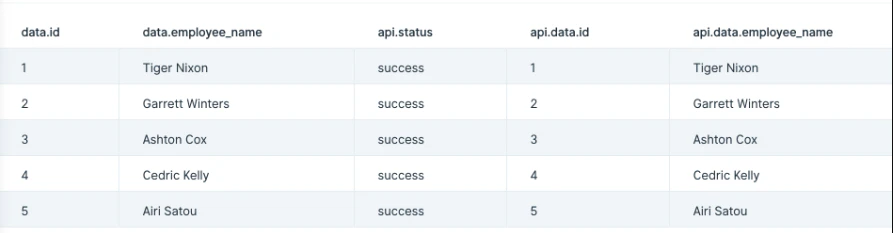
Default settings
By default, this step will try and convert as much JSON as it can, and in most cases we won’t need to change settings. This step defaults to expanding the first JSON dataset it comes across. By default, this step also sets to ‘Expand all non-datasets’. That setting is nested under the ‘Non-dataset Options’ menu. This means that all the object keys will be expanded out to as many columns as it requires. If you’re familiar with JSON, you can think of this step’s functionality like the following: datasets are JSON arrays that are expanded into new rows. Non-datasets are JSON objects that are expanded into new columns.Custom settings
To customize the default settings, we’ll first want to make sure the right dataset is selected to be expanded. We can only choose one dataset to expand or can select to expand no datasets. Datasets are expanded so that each entry is put into a new row. If our data has no dataset, then we’ll see ‘N/A’ preselected in the first option for ‘Expand the’ menu.
- If you have multiple rows of JSON and the data is not fully expanding as expecting, review the JSON body in the top row of your data. Parabola will look at the JSON in the first row and use that as a template for expanding JSON in subsequent rows. If there is an invalid or missing key in the top row, our expand step JSON step will omit that field in subsequent expanded rows. For additional information on troubleshooting this issue, please reference this community post.