

Input/output
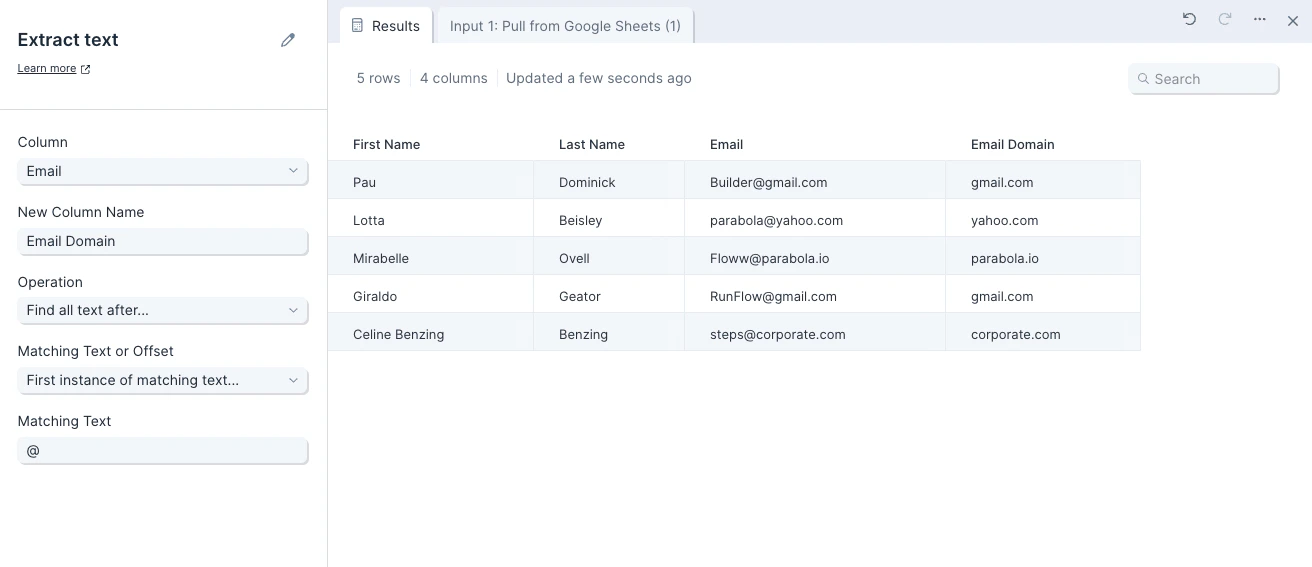
In this case, we’re looking to extract email domains from our customer email addresses. Our input data has three columns: ‘first_name’, ‘last_name’, and ‘email’.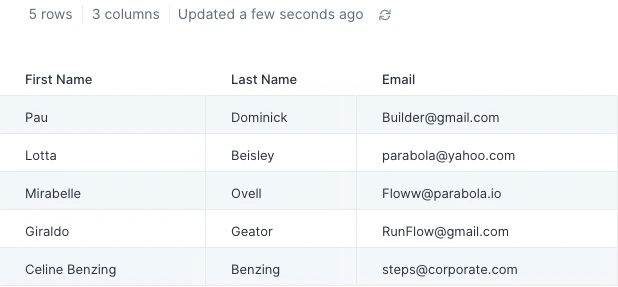
Custom settings
First, select the column that you’d like to extract text from. Then, give your new column a name. This step will always create a new column with your extracted data. Next, select an ‘Operation’. The options are:- Find all text after
- Find all text after the chosen matching text or offset
- Find all text before
- Find all text before the chosen matching text or offset
- Find some text after
- Find a set length of text after the chosen matching text or offset
- Find some text before
- Find a set length of text before the chosen matching text or offset
- First instance of matching text: You’ll set the ‘Matching’ to look for and we’ll delimit on the first instance.
- Last instance of matching text: You’ll set the ‘Matching Text’ to look for and we’ll delimit on the last instance.
- Offset from beginning of text: You’ll set the ‘Offset Length’ and we’ll count out that number of characters from the beginning of your text to determine the delimiter.
- Offset from end of text: You’ll set the ‘Offset Length’ and we’ll count out that number of characters from the end of your text to determine the delimiter.