Parcel invoice auditing

Audit DHL, UPS, and carrier invoices against your rate card automatically. Catch the rate, zone, and weight overcharges before you pay them.

The prompt

I want to audit my DHL invoices against my rate card. Build me a flow that matches each invoice line to the correct quoted rate by shipping method, pricing zone, and weight, then flags anything where the absolute rate difference is more than 3%. Show me the full audited table and a filtered view of just the discrepancies.

Just copy and paste the prompt into a new Parabola flow to get started.
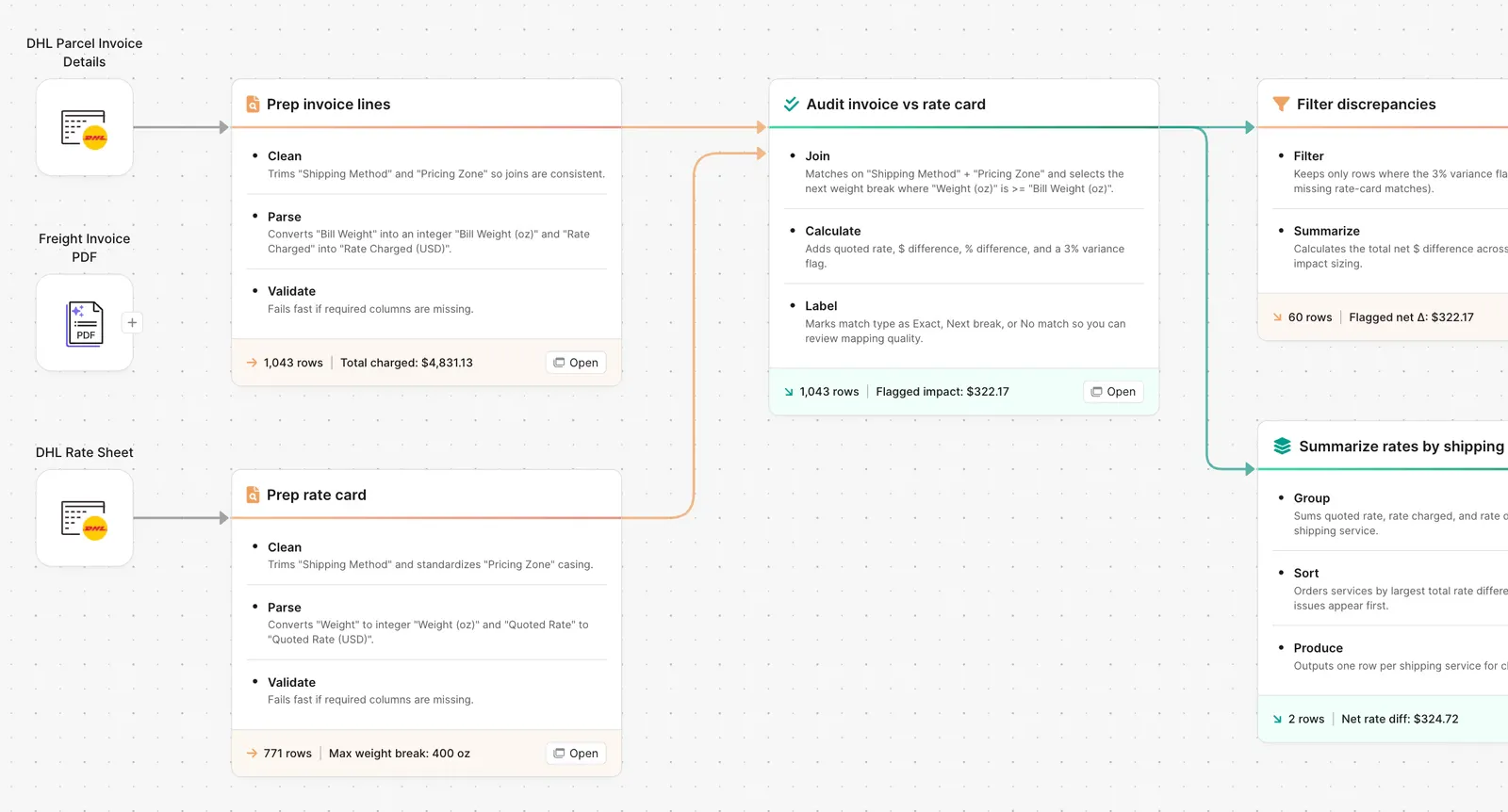
Parabola flow auditing DHL parcel invoices against a rate card to flag discrepancies

What Parabola builds

A workflow with six steps you can edit:

1. Pull the invoice file. Carrier CSV, billing system export, or PDF upload, every cycle.

2. Pull the rate card. Your contracted rates by service, zone, and weight band.

3. Match each line to the right rate. Join on shipping method, pricing zone, and weight bracket.

4. Calculate the variance. Quoted rate minus billed rate, absolute and percentage.

5. Flag anything over your threshold. Default 3 percent. You can change it to dollars, percent, or both.

6. Output the audit. Full audited table for the record, plus a filtered view of just the discrepancies for the team to dispute.

Why teams stop doing this manually

Every carrier sends a different file in a different format. CSV exports run thirty-five columns wide. PDF invoices bury the rate in a footnote. Base rate, fuel surcharge, and a stack of accessorials that change name every quarter all need to land in the same row before any audit can run.

The team that's supposed to catch the overcharges is the same team running the close, releasing pre-orders, and onboarding new SKUs. So the audit becomes a quarterly sweep. Then the sweep gets dropped. Then nobody knows what the variance actually is.

The reason it stays manual is that the rate-card-to-invoice match is exactly the kind of work that breaks Excel and breaks one-off AI prompts. The file format changes. The rate card grows. The threshold logic needs to handle "flag absolute differences over $50, but also percentage differences over three percent on shipments above five pounds." That's not a spreadsheet formula. It's a workflow.

How it works

Step 1. Paste the prompt.

Open Parabola, paste the prompt in section 2, and let it ask follow-up questions about your invoice format and rate card structure.

Step 2. Connect your data.

Carrier invoice file (CSV, Excel, or PDF), your rate card (spreadsheet or system export), and the channel you want results in (email, Slack, Parabola table).

Step 3. Run it every cycle.

Schedule weekly or monthly. The flow runs against the latest invoice file each time. New rate? Update the rate card row. New carrier? Add a new pipeline that follows the same pattern.

FAQ

Will this work if my carrier sends PDFs instead of CSVs?

Yes. The AI extraction step pulls the line items from PDF invoices in seconds. Operators in G2 reviews note workflows that take PDFs from UPS, FedEx, and ocean carriers and convert them into structured rows the audit can run against.

We use multiple carriers (DHL, UPS, FedEx). Do I need one flow per carrier?

One pattern, multiple pipelines. Each carrier has its own file format and rate card, but the match-and-flag logic is the same. Most teams build one flow and clone it.

Can I flag in dollars instead of percent?

Yes. Edit the threshold step to flag absolute differences over $50, or use both (flag anything over 3 percent OR $50, whichever is greater).

How is this different from doing the audit in Excel?

Excel works fine until your invoice file changes format, your rate card grows past 5,000 rows, or you want to run this weekly without rebuilding the workbook. Parabola handles inconsistent inputs, runs on a schedule, and shows every decision the flow made so finance can audit the audit.

Does the flow show which discrepancies to dispute first?

Sort the discrepancies output by absolute dollar variance descending. Most teams dispute the top 10 to 20 percent of variances and accept the small ones.
Stop paying for what you didn't ship.
Paste the prompt, point it at your carrier file and rate card, and let the audit run on its own.
Start for free