Agentic visualizations and reports

Turn any dataset into a clear set of performance charts. Parabola inspects your data, asks what to visualize, and builds the chart steps with your brand colors.

The prompt

Build a flow that turns data into a clear set of performance visualizations. Step 1: Inspect the data. Step 2: Ask clarifying questions one at a time about which dataset to visualize, what to group by, what to aggregate, sort field and direction, and the 2 to 3 best charts to build. Step 3: Build the flow with grouping, sort, and chart steps using selected brand colors and inferred titles.

Just copy and paste the prompt into a new Parabola flow to get started.
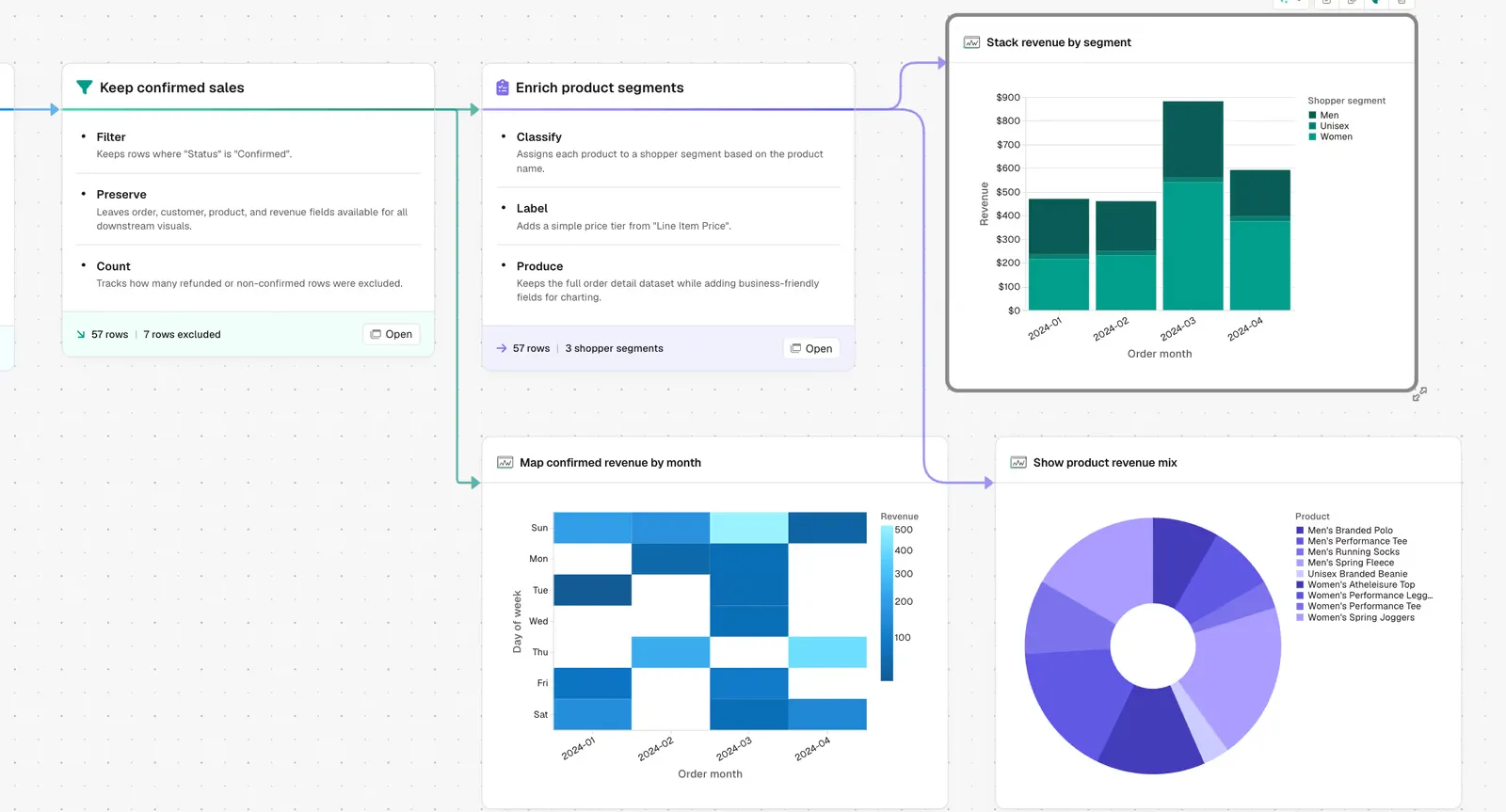
Parabola flow filtering to confirmed sales, enriching product segments, and building a stacked revenue-by-segment bar chart, a confirmed-revenue-by-month heatmap, and a product revenue mix chart

What Parabola builds

A workflow with six steps you can edit:

1. Inspect the data. Parabola reads the schema, column types, and a sample of values to understand what kind of data it is working with before asking a single question.

2. Ask six clarifying questions, one at a time. Which dataset to pull from. What dimension to group by. What metric to aggregate. Which field to sort on and in which direction. Which two or three chart types fit the data best. What brand colors to use.

3. Build the summary step. Aggregate the data by the chosen dimension, calculate the chosen metric, and prepare a clean output table.

4. Build the sort step. Order the rows by the chosen sort field so the chart reads in the right direction from the start.

5. Build the chart steps. Each chart type gets its own step, with your brand colors applied and titles inferred from the column names and aggregation logic.

6. Polish the layout. Axis labels, legend placement, and column ordering cleaned up so the output is ready to share, not just technically correct. There is also a Parabola-Suggested variant of this prompt that skips the question sequence and lets Parabola decide grouping, chart type, and layout from context, useful when you want a first draft in one shot.

Why teams stop doing this manually

Most teams already have the data. The close report is in Parabola. The vendor scorecard runs on a schedule. The order consolidation flow produces a clean table every morning. The bottleneck is not the data, it is what happens next.

Getting from a clean table to a chart that somebody can read in a meeting takes longer than it should. You export to Sheets, build the pivot, fight with the chart editor, fix the colors to match the brand, and repeat every time the underlying data changes. The chart is a snapshot. The data is live. Those two things do not stay in sync.

The other problem is discretion. Choosing which two charts to show from a dataset with twelve possible cuts is a judgment call that takes time and context. Different teams make different calls. The output varies. The meeting takes five minutes longer explaining the methodology than discussing the numbers.

Parabola handles the visualization layer the same way it handles the data layer. It inspects what you have, asks what matters, and builds the chart steps inside the same flow. When the data updates, the charts update. There is nothing to re-export and nothing to reformat.

How it works

Step 1. Paste the prompt.

Open Parabola, paste the prompt in section 2, and point it at a dataset you have already built a flow around. Or connect a new data source directly.

Step 2. Answer the questions.

Parabola asks one question at a time. Dataset, grouping, metric, sort field, chart types, brand colors. Six questions total. You type the answers and Parabola builds the corresponding steps.

Step 3. Run it on a schedule.

Daily, weekly, or whenever the source data refreshes. The charts regenerate against the latest data each time, with no manual export required.

FAQ

Does this work on any dataset, or only specific flow outputs?

Any tabular data. If Parabola can build a flow that produces a table, it can add chart steps on top. That includes data pulled directly from APIs, Sheets, CSVs, NetSuite, Shopify, or any other connected source.

What chart types are available?

Bar charts, line charts, scatter plots, and table views. Parabola recommends two or three based on the shape of the data and the grouping you choose. You confirm or swap during the question sequence.

Can I use my brand colors?

Yes. Provide the hex codes or color names during the question sequence and Parabola applies them to all chart steps at build time.

How is this different from building a chart in Google Sheets or Looker?

Sheets charts are snapshots. When the underlying data changes, the chart does not update until you re-export and rebuild. Looker requires a BI analyst or SQL. The Parabola visualization step lives inside the same flow as the data, so the chart refreshes every time the flow runs, no manual intervention required.

What if I want Parabola to make all the decisions automatically?

Use the Parabola-Suggested variant. Paste a shorter prompt that skips the question sequence, and Parabola infers the grouping, chart types, and layout from the data. Useful for a first draft. The interactive version gives you more control over the final output.

Can one flow produce multiple charts?

Yes. The flow adds a separate chart step for each chart type you select. Each step operates on the same summary table, so they all stay in sync when the data refreshes.
Make your data visible.
Paste the prompt, point it at any dataset you are already tracking, and let Parabola build the chart steps. The visualizations update every time the flow runs.
Start for free