Inbound container tracking

Combine inbound shipment data from every forwarder into one normalized table. See every container, every status, every ETA without chasing carriers.

The prompt

I want to track inbound shipments across K&N, Flexport, and DHL. Build me a flow that combines each forwarder's data into one consistent table and removes any duplicate shipments.

Just copy and paste the prompt into a new Parabola flow to get started.
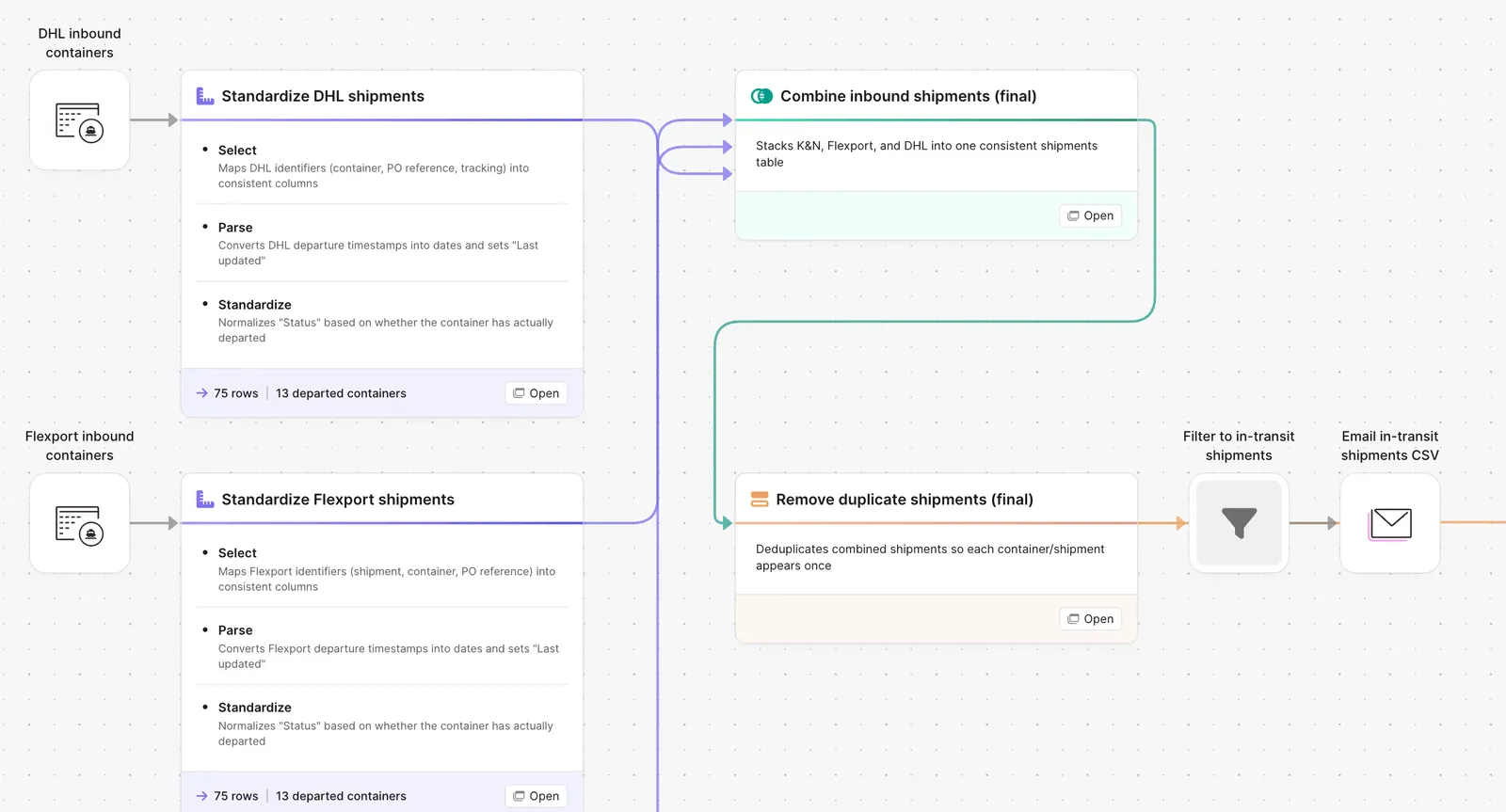
Parabola flow combining inbound container shipments from multiple carriers

What Parabola builds

A workflow with five steps you can edit:

1. Pull from each forwarder. API, portal export, or daily email feed. Each forwarder gets its own source pipeline.

2. Standardize the schema. Container number, BOL, PO, vessel, ETA, status. One column structure across all forwarders.

3. Dedupe. Same container, multiple sources, one row in the output.

4. Calculate the position. On the water, at port, in customs, in transit, delivered. Plus days to ETA and days overdue.

5. Output the table. Single dashboard view, exception list for at-risk shipments, Slack alert for changes.

Why teams stop doing this manually

A brand with three forwarders has three portals, three CSV formats, three different ways of naming the same field. The ops team that needs visibility into inbound containers spends Monday morning logging into each portal, downloading the latest update, and stitching it into a workbook.

The workbook gets stale by Tuesday afternoon. The ETA that was accurate Monday is two days off by Wednesday. The container that went into customs Thursday morning shows as "on the water" in the workbook until Friday when somebody refreshes it. The team is making receiving decisions, labor calls, and chargeback risk assessments against a snapshot that does not match reality.

The fix is not a fourth portal. It is a single table fed by every source on a schedule, with a refresh cycle that matches the pace the business actually runs at.

How it works

Step 1. Paste the prompt.

Open Parabola, paste the prompt in section 2, and let it ask follow-up questions about your forwarders, data feeds, and refresh cadence.

Step 2. Connect your data.

Forwarder APIs, portal export feeds, or daily email reports. The flow handles any of them.

Step 3. Run it every cycle.

Daily is standard. Some teams refresh twice a day during peak. New forwarder? Add a source pipeline that follows the same pattern.

FAQ

Does this work if my forwarder only emails me a daily update?

Yes. The flow can pull from an inbox, parse the attachment, and feed the same standardization step. API connections are faster but not required.

How does it handle the same container appearing in multiple feeds?

The dedupe step matches on container number plus BOL. Same container, multiple sources, one row.

Can I flag containers that are stuck in customs?

Yes. Configure a customs-time threshold. Anything sitting at port or in customs longer than that gets surfaced in the exception list.

What about partial loads or LCL shipments?

LCL ships under multiple BOLs that share a master. The flow tracks each BOL line and rolls up to the master container view.

How is this different from the forwarder portals?

Each portal shows you that forwarder's view. The flow shows you every forwarder in one table with the same fields, refreshed on the same schedule.
One table. Every container. Every morning.
Paste the prompt, point it at your forwarder feeds, and let the visibility refresh itself.
Start for free