Landed cost calculation

Validate freight and duty invoices against your GL, then allocate freight and duty to each SKU for a per-unit landed cost the finance team can defend.

The prompt

I want to validate my freight and duties invoices against my G/L actuals and calculate landed costs for my transfer orders. Build me a flow that flags any mismatches between invoices and the G/L, and allocates freight and duty costs to each SKU line to get a per-unit landed cost.

Just copy and paste the prompt into a new Parabola flow to get started.
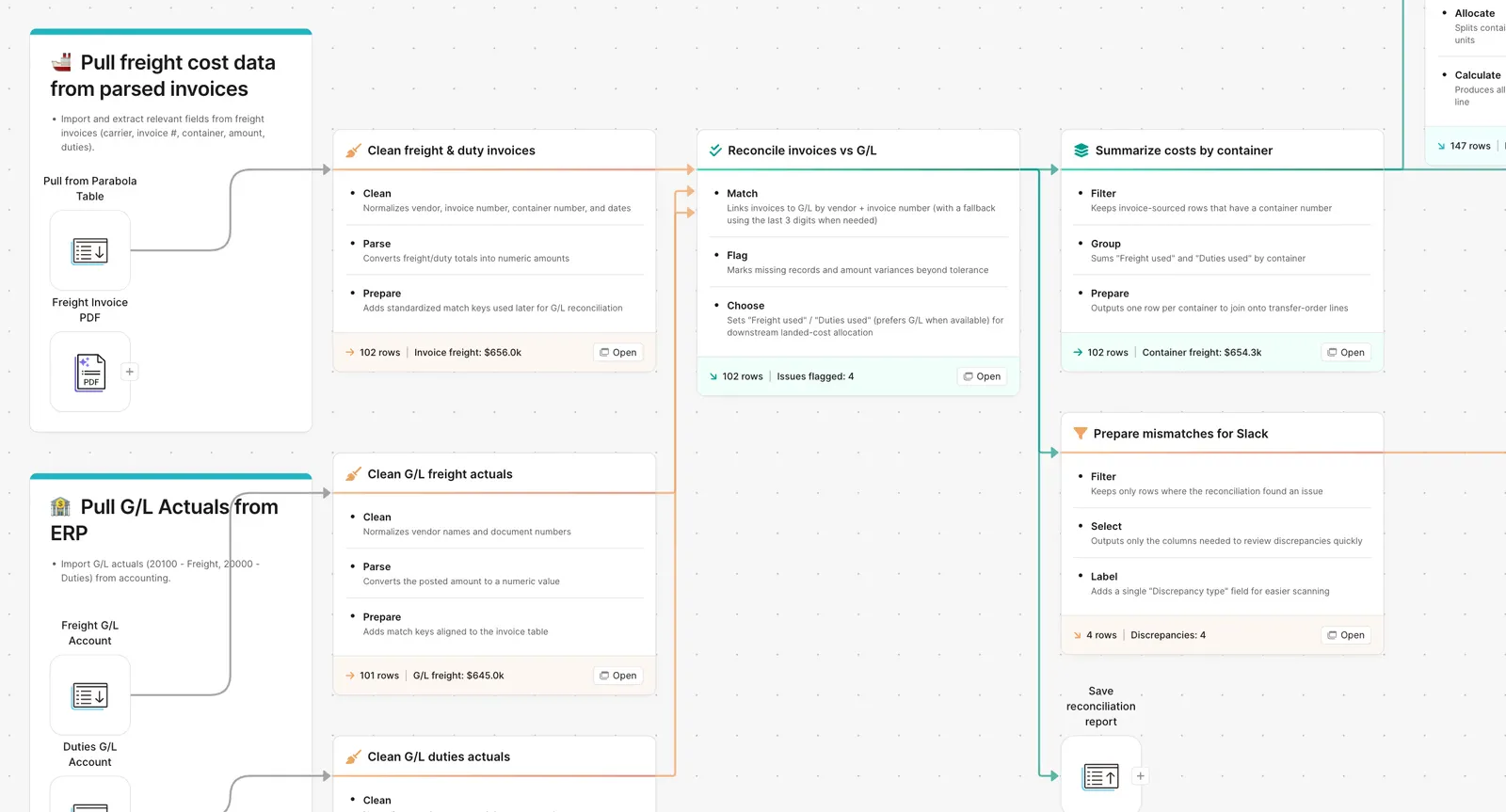
Parabola flow reconciling freight invoices against the G/L to allocate landed cost

What Parabola builds

A workflow with six steps you can edit:

1. Pull the freight and duty invoices. Forwarder invoices, customs declarations, broker bills.

2. Pull the GL actuals. Posted freight and duty entries from your accounting system.

3. Reconcile invoice vs GL. Flag anything posted but not invoiced or invoiced but not posted.

4. Pull the transfer orders. SKU, quantity, and value for every shipment.

5. Allocate freight and duty. Distribute each invoice across the SKUs that shipped, by value or by weight, your choice.

6. Output per-unit landed cost. SKU, base cost, allocated freight, allocated duty, total landed cost. Plus the reconciliation report for finance.

Why teams stop doing this manually

Landed cost is the number that decides margin, pricing, and which SKUs are actually profitable. It is also the number that nobody trusts because the inputs are scattered across a forwarder bill, a customs declaration, and a GL entry that may or may not match either of them.

The manual version is a workbook that pulls each invoice, lines them up against the GL, runs an allocation by value or by weight, and pushes the result back into the ERP. It works for one container. It breaks at fifty. By the time the team gets per-SKU landed cost, the next container is on the water and the previous month's numbers are already in front of the CFO.

The shortcut most teams take is allocating freight to a single GL bucket and hoping the per-SKU number gets close. It rarely does. SKUs that ship cheap subsidize SKUs that ship expensive, and the margin report tells a story the inventory data does not support.

How it works

Step 1. Paste the prompt.

Open Parabola, paste the prompt in section 2, and let it ask follow-up questions about your freight invoice sources, GL structure, and allocation method.

Step 2. Connect your data.

Forwarder invoice feed, customs declaration export, GL extract from your accounting system, transfer order list from the ERP.

Step 3. Run it every cycle.

Per shipment, weekly, or at close.

FAQ

Can I allocate freight by weight instead of value?

Yes. Allocation method is configurable. Some teams use value for finished goods and weight for raw material. The flow lets you set the rule per product category.

What about partial shipments or split containers?

When a container ships multiple POs or arrives in pieces, the flow allocates freight based on the SKUs actually on that bill of lading. The reconciliation report shows the full picture across the parent PO.

How does this handle duty drawback?

The flow keeps duty as its own cost component. When drawback claims come back, they net against the duty bucket and the per-SKU landed cost updates automatically.

Can the output feed our ERP directly?

Yes. The per-SKU landed cost output writes back to the inventory cost layer in NetSuite, SAP, or whatever ERP you run. Some teams generate a GL journal entry; others update item cost directly.

How is this different from a TMS or cost-accounting module?

A TMS tracks shipments. A cost-accounting module posts entries. The flow does the join across both, plus the allocation across SKUs, plus the reconciliation against the GL. It is the layer between them.
Know what your SKUs actually cost to land.
Paste the prompt, point it at your freight invoices, GL, and transfer orders, and let the landed cost build itself.
Start for free