COA standardization

Extract test results from supplier COA PDFs, standardize the test names, and evaluate pass or fail automatically. Stop chasing QA inboxes for compliance data.

The prompt

I want to automate my COA review process. Build me a flow that extracts test results from a COA PDF, standardizes the test names, filters to only the tests I care about, and evaluates each one as pass or fail.

Just copy and paste the prompt into a new Parabola flow to get started.
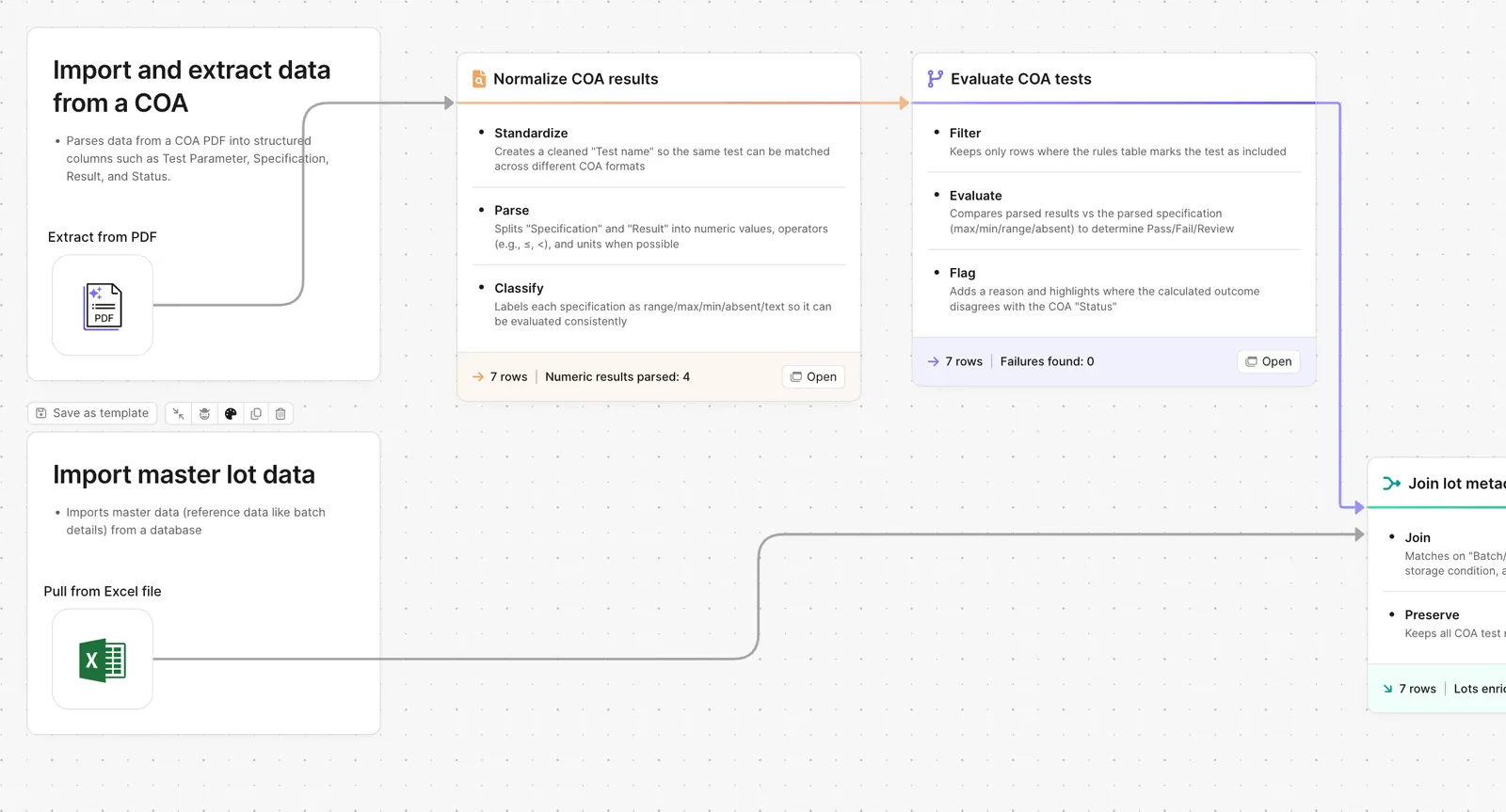
Parabola flow normalizing and evaluating COA test results against rules

What Parabola builds

A workflow with five steps you can edit:

1. Receive the COA PDF. Forwarded from supplier email, uploaded to a folder, or pulled from a supplier portal.

2. Extract the test results. The AI step pulls each test name, value, unit, and reference range from the PDF.

3. Standardize the test names. Map every supplier's naming convention to your internal test taxonomy.

4. Filter to the tests you care about. Keep only what your spec requires. Drop the rest.

5. Evaluate pass or fail. Compare each value against your spec. Output the verdict per test and the overall COA status.

Why teams stop doing this manually

Every supplier formats their COA differently. The test names change. The units change. The reference ranges drift. The PDF that arrived last month looked nothing like the one that arrived today. The QA team opens each one, reads it carefully, and types the values into a spec sheet to decide pass or fail.

The manual version is slow when volume is small and impossible when volume is large. Pull twenty COAs a week and the QA queue is a steady job. Pull two hundred and the work backs up, suppliers get blocked, and material sits on the dock waiting for a thumbs up.

The hard part is not the chemistry. It is the unstructured PDF. The same value buried in twelve different layouts. Until that gets normalized into a row in a table, the spec comparison is a human reading PDFs.

How it works

Step 1. Paste the prompt.

Open Parabola, paste the prompt in section 2, and let it ask follow-up questions about your supplier mix, test taxonomy, and spec format.

Step 2. Connect your data.

COA inbox or supplier portal feed, your internal test taxonomy, your spec library.

Step 3. Run it on every COA.

Trigger on each new email or run on a batch. The output goes wherever QA reviews exceptions.

FAQ

Does this work if every supplier sends a different PDF layout?

Yes. The AI extraction step handles layout variance. The standardization step maps each supplier's naming to your taxonomy.

Can the flow flag tests that are borderline pass?

Yes. Add a tolerance band. Anything inside the spec passes. Anything inside the tolerance band gets flagged for QA review. Anything outside fails.

What happens when a new test shows up that isn't in our taxonomy?

The flow flags an unmapped test rather than silently dropping it. QA reviews, decides whether to add it to the taxonomy, and the next COA from that supplier handles it automatically.

Can I run this against a batch of COAs at once?

Yes. Drop a folder of PDFs in and the flow processes each one. Output is one row per COA with the verdict, plus a detail table with each test.

How is this different from manually parsing?

Manual works at low volume. The flow scales to hundreds per week without the QA team becoming a PDF-reading service.
Move material off the dock the day the COA arrives.
Paste the prompt, point it at your COA inbox and your spec library, and let the review run on its own.
Start for free