Three-way PO matching

Match your purchase orders against delivery receipts and supplier invoices automatically. Flag every quantity discrepancy at the PO and SKU level.

The prompt

I want to validate my purchase orders across my ERP, delivery receipts, and PDF invoices. Build me a flow that matches everything at the PO and SKU level, calculates any quantity discrepancies, and labels each line as waiting on receipt, under-delivered, over-delivered, or correct.

Just copy and paste the prompt into a new Parabola flow to get started.
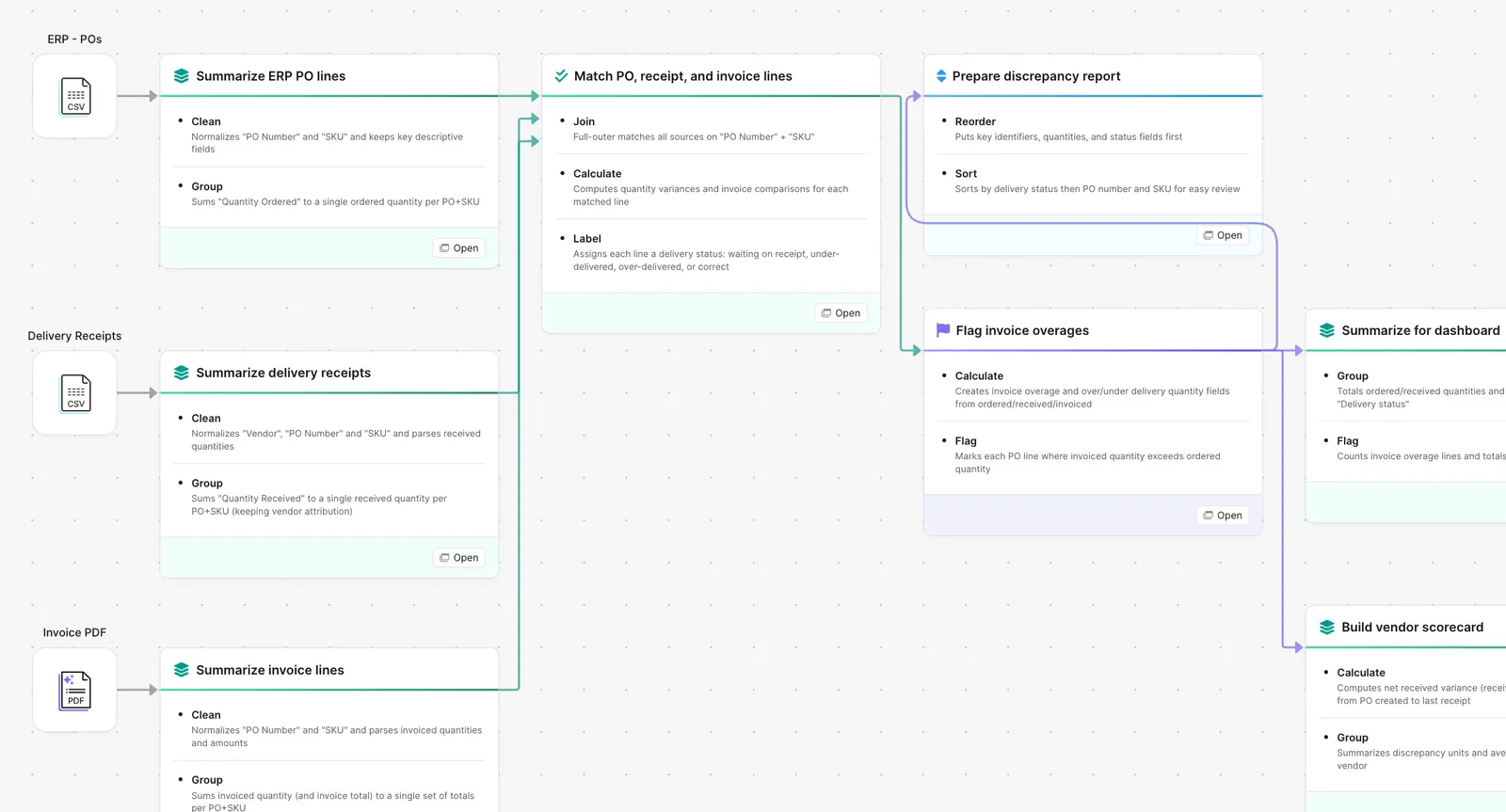
Parabola flow matching POs, delivery receipts, and invoices to flag discrepancies

What Parabola builds

A workflow with six steps you can edit:

1. Pull the PO list from your ERP. Open POs with vendor, SKU, quantity, and expected receipt date.

2. Pull the receipts. From the WMS, the 3PL portal, or the receiving inbox.

3. Pull the invoices. PDF invoices land in the inbox, the AI step extracts each line.

4. Match at PO and SKU level. Three-way join across PO, receipt, and invoice.

5. Calculate the discrepancies. Quantity ordered vs received vs invoiced, in units and percent.

6. Label every line. Waiting on receipt, under-delivered, over-delivered, invoice mismatch, or correct. Output goes to whoever owns the dispute.

Why teams stop doing this manually

A clean three-way match is a finance fairy tale. In practice, the ERP says one thing, the WMS reports another, and the invoice arrives a week later with a third number on it. Someone has to figure out which one is real before payment goes out.

The team that runs the match is the same team running receiving, vendor onboarding, and the close. So the match becomes a sample. Then the sample becomes a quarterly sweep. Then the sweep gets dropped because the invoice queue is moving and AP needs to release. By the time anyone notices the under-delivery, the vendor has invoiced for the full PO and the discrepancy is on us.

The fix is not a bigger spreadsheet. It is the same matching logic run on a schedule, against live data, with a label on every line that tells the dispute team where to start.

How it works

Step 1. Paste the prompt.

Open Parabola, paste the prompt in section 2, and let it ask follow-up questions about your ERP, receipt source, and invoice format.

Step 2. Connect your data.

ERP API or export, receipt feed from the WMS or 3PL, invoice inbox or AP system.

Step 3. Run it every cycle.

Daily or weekly. The match runs against the latest data and refreshes the labels. New vendor? Add a row to the rules table.

FAQ

Does this work if my receipts are paper or scanned packing lists?

Yes. The AI extraction step parses scanned receipts and PDF packing lists into structured rows. Most teams forward the receiving inbox to the flow and the matching runs on the latest receipts each cycle.

We use multiple ERPs across regions. Can the flow handle that?

One pattern per ERP, all feeding the same match. Add a new source pipeline for each system and route everything through the standardization step at the top.

Can I set different tolerances by vendor?

Yes. Tolerance is a configurable rule, not a hardcoded threshold. Some teams accept plus-or-minus one unit for high-volume vendors and require zero variance for high-cost SKUs.

How does this handle partial shipments?

A partial receipt against an open PO labels the line as under-delivered with the remaining balance shown. When the second receipt lands, the flow updates the label automatically.

How is this different from a spreadsheet?

Excel works fine until your supplier base, SKU count, or invoice volume grows past a workbook. Parabola handles inconsistent inputs, runs on a schedule, and shows every decision the flow made so AP can audit the audit.
Stop releasing payment against a number nobody verified.
Paste the prompt, point it at your ERP, receipts, and invoice inbox, and let the match run on its own.
Start for free