Overdue invoice escalation

Catch every invoice 30+ days overdue, match each one to its account owner, and post a digest to your AR Slack channel with the amount, the days late, and the link. No more weekly AR export.

The prompt

Every week someone on our team exports open invoices from QuickBooks Online and tracks down the ones that are overdue. Build me a flow that pulls all open invoices from QuickBooks Online, keeps only the ones more than 30 days past due, matches each one to its account owner from our customer sheet, and posts a single message to our AR Slack channel listing every overdue invoice with the customer name, the account owner, the amount, how many days overdue it is, and a link to the invoice.

Just copy and paste the prompt into a new Parabola flow to get started.
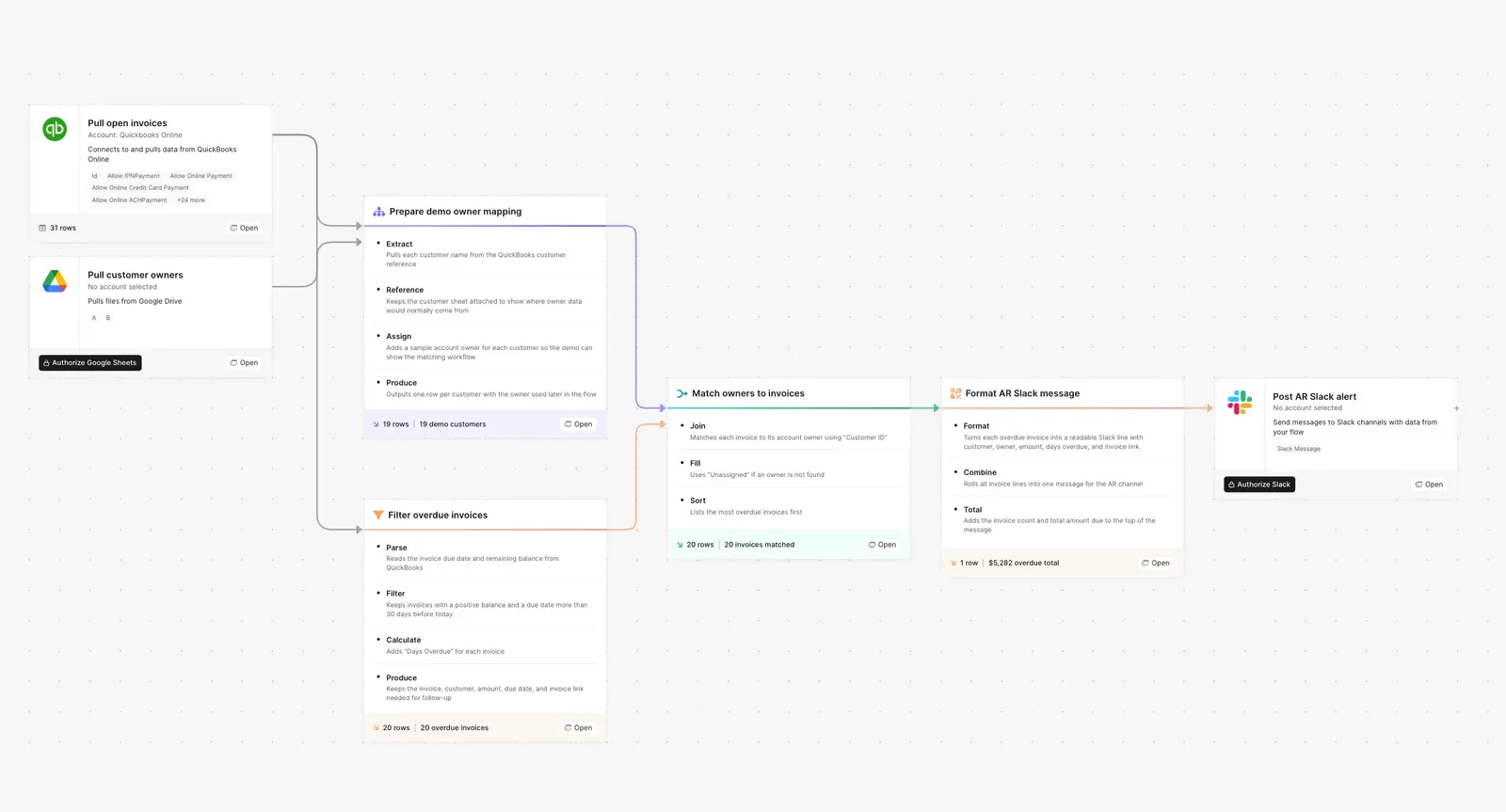
A Parabola flow that pulls open invoices from QuickBooks Online, filters to invoices more than 30 days overdue, matches each to its account owner, and posts the digest to Slack.

What Parabola builds

A workflow with five steps you can edit:

1. Pull open invoices from QuickBooks Online. The QBO step fetches every open invoice with its invoice date, amount, customer, and due date.

2. Filter to overdue. Keep only invoices where days past the due date is greater than 30. Change the threshold to whatever your AR policy uses.

3. Match each invoice to its owner. Join on customer name or ID against your account-owner source, a Google Sheet, Salesforce, or HubSpot, to attach the right rep's name to every row.

4. Segment by severity. Split into buckets: 30 to 60 days, 60 to 90 days, 90+ days, so the oldest balances get the loudest signal.

5. Post the digest to Slack. Send one grouped message to your AR channel, sorted by how overdue each invoice is: Acme Corp, $4,200, 47 days overdue, owner Jane S., here's the link. The whole list lives in one place, and every line names who owns it.

Why teams stop doing this manually

Aged receivables are a cash problem disguised as a clerical one. The longer an invoice sits, the less likely it gets paid in full, and the work to chase it always lands on the same person. An AR analyst exports open invoices from QuickBooks, sorts by due date, filters for anything past 30 days, then opens the CRM to figure out who owns each account before pinging that rep one message at a time.

It takes two to three hours every week, and the part that hurts is not the time. It is that the work is invisible until it is late. A busy week means the export does not happen, the oldest balances keep aging, and nobody notices until a customer is 90 days out and the account owner says they never knew. The follow-up that protects cash depends on one person remembering to run a manual report.

The version that holds up is the one that runs whether or not anyone remembers. The overdue list gets built on a schedule, every invoice is already matched to its owner, and the whole thing posts to your AR Slack channel with the customer, the owner, the amount, and how late it is. The analyst reviews what got flagged instead of assembling the flag.

How it works

Step 1. Paste the prompt.

Open Parabola, paste the prompt in section 2, and let it ask follow-up questions about your overdue threshold, your account-owner source, and where the alerts should land.

Step 2. Connect your data.

Your QuickBooks Online account, the sheet or CRM that maps customers to account owners, and your Slack workspace.

Step 3. Run it every week.

Schedule it for Monday morning, or trigger it daily. Your AR channel gets a fresh list of overdue accounts, each line tagged with its owner, without anyone touching a spreadsheet.

FAQ

How is this different from QuickBooks' built-in overdue reminders?

QuickBooks reminders email the customer. This posts the overdue list to your team's AR channel, each line tagged with the account owner who owns the relationship, plus the amount, the days overdue, and the link, segmented by how late each invoice is. The owner follows up with context instead of a generic dunning email going out under your name.

Does this work with NetSuite or Ramp instead of QuickBooks?

Yes. Swap the source step for NetSuite, Ramp, or another billing system. The filter, the owner match, and the Slack alert stay the same.

Where does the account-owner mapping come from?

Whatever you already maintain. A Google Sheet, Salesforce, or HubSpot. The flow joins on customer name or account ID to attach the right rep to each invoice.

Can it post somewhere other than a shared Slack channel?

Yes. Email each owner their own list, post to a Parabola Table the AR team reviews, or open a task in Asana. Most teams start with a single digest to a shared AR channel.

How is this different from doing this in Excel?

Excel works until you are cross-referencing 200+ open invoices against owner assignments every week and pasting messages by hand. Parabola handles the lookup, segments by how overdue each invoice is, runs on a schedule, and shows every decision it made so AR can audit what got flagged.
Stop letting overdue invoices slip through the cracks.
Paste the prompt, connect QuickBooks and your owner sheet, and every overdue invoice lands in your AR channel, tagged with its owner, the moment it ages past your threshold.
Start for free