Variance analysis

Compare forecasted spend against actuals automatically. Flag variances over your threshold by month and SKU so finance starts month-end with answers, not a workbook.

The prompt

I want to compare my forecasted 3PL storage spend against my actual invoiced costs. Build me a flow that joins my sales forecast and rate card to calculate expected storage costs using the flat rate only, then compares that to my actual invoices by month and SKU and flags any variances over $500.

Just copy and paste the prompt into a new Parabola flow to get started.
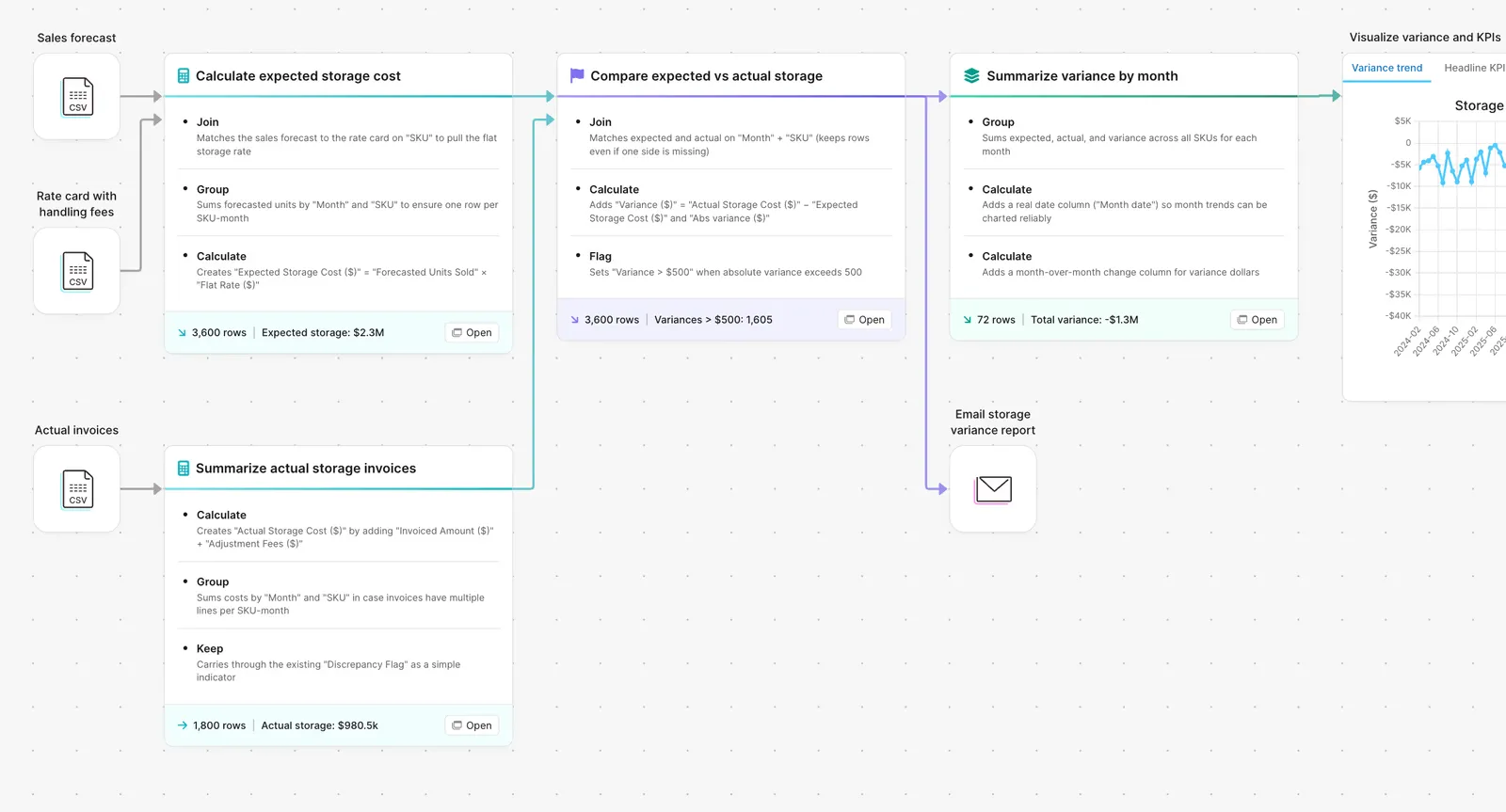
Parabola flow comparing expected vs actual storage spend to surface variance

What Parabola builds

A workflow with six steps you can edit:

1. Pull the forecast. From the FP&A model, the planning system, or the budget spreadsheet.

2. Pull the rate card. Storage rates by SKU class, location, or service tier.

3. Calculate the expected cost. Apply the rate to the forecasted volume.

4. Pull the actuals. Invoiced costs from AP or the 3PL portal.

5. Compare line by line. Forecast vs actual, in dollars and percent, at the level of granularity finance cares about.

6. Flag the variances. Anything over your threshold (default $500) gets surfaced for explanation.

Why teams stop doing this manually

Variance analysis is the part of close where every cell matters and every cell is hand-built. The forecast lives in one model. The actuals live in three different systems. The rate card is a tab in a workbook that someone updates the morning of the meeting.

The manual version is a Frankenstein workbook. Tabs feed pivots that feed a summary that feeds the slide deck. When the forecast model gets a fresh load, everything downstream needs a refresh, and the refresh breaks one or two formulas. The analyst spots the break right before the meeting if they are lucky, and the explanation becomes "the workbook is wrong, I'll fix it after" instead of "here is why margin moved."

The work that earns the close meeting is the explanation. The work the analyst is actually doing is workbook archaeology.

How it works

Step 1. Paste the prompt.

Open Parabola, paste the prompt in section 2, and let it ask follow-up questions about your forecast source, rate card structure, and variance threshold.

Step 2. Connect your data.

FP&A export or planning API, rate card spreadsheet or pricing system, AP feed for actuals.

Step 3. Run it every period.

Monthly close, mid-month flash, or weekly during peak.

FAQ

Can I run variance against budget instead of forecast?

Yes. Replace the forecast source with the budget table. Same downstream logic.

What if my forecast is at one granularity and my actuals are at another?

The flow rolls one side up to match the other. Forecast by category against actuals by SKU? The flow aggregates the actuals to category before comparing.

Can I set different thresholds by line type?

Yes. Thresholds are configurable rules. Some teams use $500 for OPEX lines and $5,000 for COGS lines. Some use one percent for material and ten percent for indirect.

How do we explain a variance once it's flagged?

Each flagged line links back to the underlying actual and forecast rows. The explainer sees exactly what the actual was, what the forecast assumed, and where the gap is.

How is this different from a BI tool?

BI tools render the result. This flow does the upstream join and the variance math, then hands the BI tool a clean variance table. The hard part is the join logic, not the chart.
Start month-end with answers, not a workbook.
Paste the prompt, point it at your forecast and actuals, and let the variance flag the lines that need explanation.
Start for free