Wholesale OTIF scorecards

Track on-time and in-full at the order level across Walmart, Target, Ulta, and every other retailer. Monthly KPIs and exception alerts without rebuilding the workbook.

The prompt

I want to track OTIF performance across my Walmart and Ulta fulfillments. Build me a flow that combines both into one table, calculates on-time and in-full rates at the order level, and rolls everything up to monthly KPIs by wholesaler.

Just copy and paste the prompt into a new Parabola flow to get started.
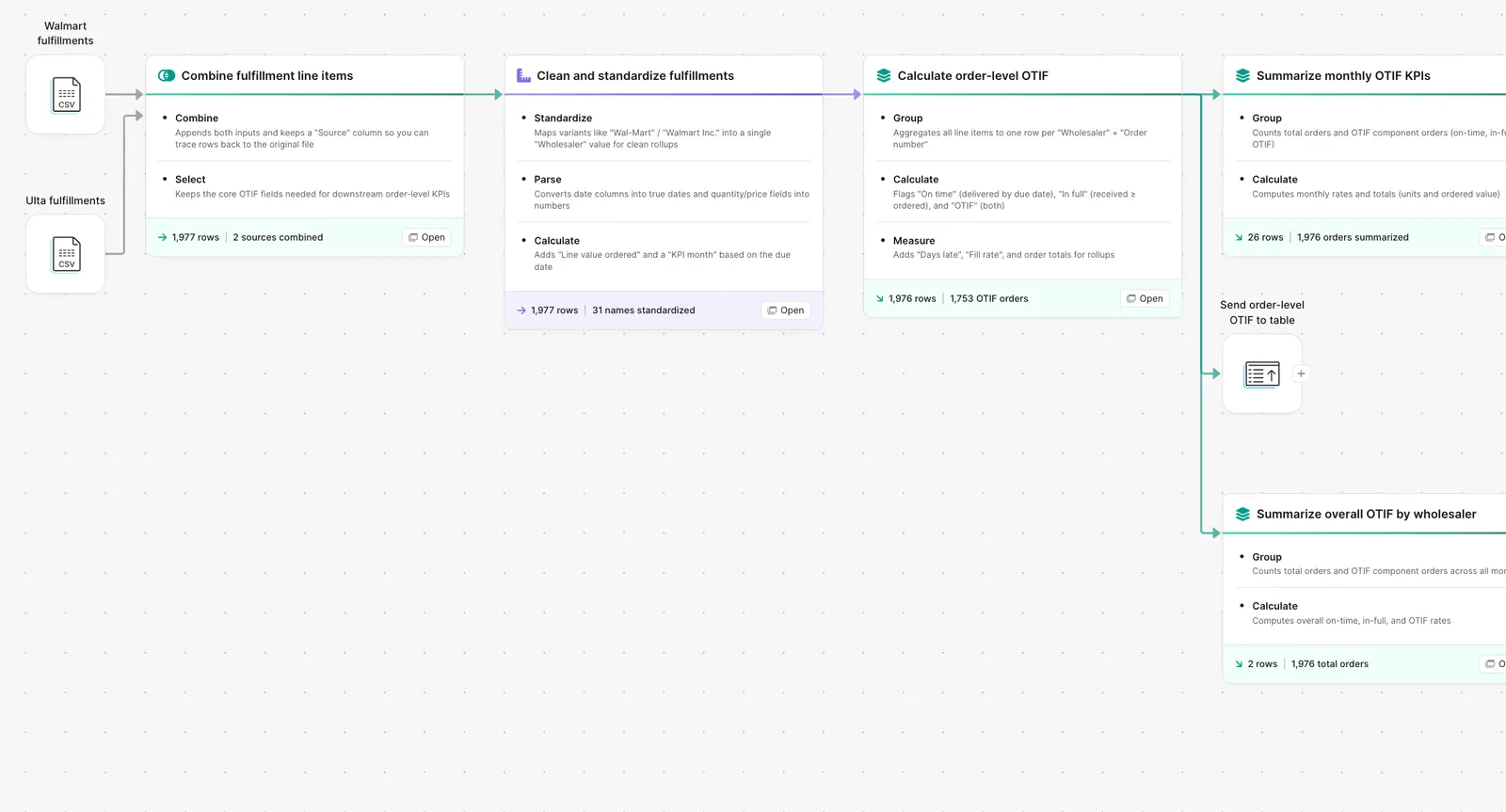
Parabola flow combining Walmart and Ulta fulfillments into an OTIF scorecard

What Parabola builds

A workflow with six steps you can edit:

1. Pull fulfillment data from each retailer. Walmart Retail Link, Target POL, Ulta portal, EDI 856 ASN. Each gets its own pipeline.

2. Standardize the schema. PO, ship date, must-arrive-by, quantity ordered, quantity shipped, quantity received. Same fields across retailers.

3. Calculate on-time per order. Did the order ship within the window the retailer required.

4. Calculate in-full per order. Did the order ship the quantity the retailer ordered.

5. Roll up to monthly KPIs by retailer. OTIF rate, on-time rate, in-full rate, dispute rate.

6. Output the scorecard. Per-retailer monthly KPI table plus an exception view for orders that missed the window.

Why teams stop doing this manually

OTIF is the retailer's lever. Walmart, Target, Ulta, and the rest each define their own version of "on time" and "in full," each enforce their own chargeback for failure, and each grade your brand monthly. The vendor team is responsible for explaining the score, the wholesale team is responsible for fighting the chargebacks, and finance is responsible for projecting the impact on margin.

The manual version is a spreadsheet per retailer, a master pivot, and a set of formulas that depend on the retailer's portal export not changing format. The retailer's portal always changes format. By the time the scorecard is built, the chargeback window for the worst orders has closed and the dispute team has nothing to file.

The hard part is not the math. It is the multi-retailer normalization. Until every fulfillment lands in the same table with the same fields, there is no scorecard.

How it works

Step 1. Paste the prompt.

Open Parabola, paste the prompt in section 2, and let it ask follow-up questions about your retailer mix, ASN feed, and KPI granularity.

Step 2. Connect your data.

Retailer portals (Walmart Retail Link, Target POL, Ulta), EDI 856 ASN feed, carrier scan data for delivery confirmation.

Step 3. Run it every cycle.

Daily for exception alerts, monthly for the scorecard rollup.

FAQ

Different retailers define on-time differently. Can the flow handle that?

Yes. Each retailer gets its own on-time window rule. Walmart's must-arrive-by date, Target's appointment window, Ulta's lead-time window. The same flow applies each retailer's rule to that retailer's orders.

What about partial shipments?

A partial ship counts against in-full at the order level. The flow shows the percent shipped and the units shorted so the dispute team can decide whether the chargeback is defensible.

Can I run the scorecard for one retailer at a time?

Yes. Filter the output to one retailer for the team that owns that account. Some brands run a single master scorecard plus a per-retailer drill-down.

How does the flow handle backorders?

Backorders show as a separate ship event. If the original order missed the window and the backorder ships on time, the flow tracks both events and rolls them up consistently.

How is this different from the retailer's own scorecard?

Each retailer shows you that retailer's view. The flow shows you every retailer in one comparison table. Finance can see total OTIF exposure across the wholesale book.
Know your score before the retailer sends the chargeback.
Paste the prompt, point it at your retailer feeds, and let the scorecard build itself.
Start for free